
Before setting up Momentum, confirm that your org has the required external accounts and Salesforce features, and check whether any incompatible features are enabled. Momentum requires Google Workspace™ or Microsoft 365™, Data 360, and Einstein Generative AI. Momentum isn’t compatible with Einstein Activity Capture or Einstein Conversation Insights.
Connection to Either Google Workspace or Microsoft 365
Momentum requires a connection to either Google or Microsoft as the activity provider to sync calendar events, capture email messages, and record video calls. To automatically record video calls with Momentum, your calendar must be connected and sync to Salesforce. Every user must also grant Salesforce access to their individual Google or Microsoft account.
Required Salesforce Features
If Einstein Generative AI isn’t already enabled, Momentum turns it on during the setup process. If you turn off Einstein Generative AI, the Momentum features and products relying on Momentum data aren’t guaranteed to perform as expected.
Momentum uses Data 360 to store and process video call data transcripts, recordings, and metadata. Before you can turn on Momentum, you must set up Data 360. Data transformations and calculated insights might result in Data 360 consumption-based billing. If you use Data 360 independently or with other Salesforce features, standard Data 360 pricing and billing applies for those products and services. See Data Services Billable Usage Types for Data 360.
Call Processing Allocation
Each Momentum user license includes either 120 or 675 processed hours per year, depending on your license type, prorated for your contract length. The total number of allocated hours is determined by the total number of licenses. For example, if you have 10 licenses each with 675 hours, your org has a total of 6,750 hours allocated for video call processing. Unused hours expire at the end of your contract and don't roll over.
Usage with Einstein Conversation Insights
Momentum is an independent video call capture tool, and isn't incompatible with Einstein Conversation Insights (ECI). If you want to use Momentum, make sure you've disabled ECI.
Einstein Conversation Insights must be disabled to use Momentum, and after Momentum's enabled it isn't possible to enable ECI again at a later time.
Turn Off Einstein Activity Capture
Momentum is incompatible with Einstein Activity Capture (EAC). Because Salesforce uses the same infrastructure to sync events and capture email data in both Momentum and EAC, they can’t operate simultaneously. If EAC is enabled in your org, turn it off, disconnect your org from your Google or Microsoft account, and reset EAC before you turn on Momentum.
Momentum event sync and email capture work the same as in EAC, but Momentum doesn’t sync contacts between Salesforce and your connected account. However, if you use Momentum for email capture, you can turn on automatic contact creation and automatic contact creation and automatic contact enhancement. Before you move from EAC to Momentum, evaluate your org and user needs to make sure that your team is ready to transition.
Disconnect the Connected Account
If you’ve set up EAC with user level authorization, each user must disconnect their own account. You can’t turn on Momentum until every account is disconnected. Communicate with your users about how to disconnect their account. If you’ve set up EAC with global authorization, you can skip this step because all accounts are disconnected when you turn off EAC in the next step.
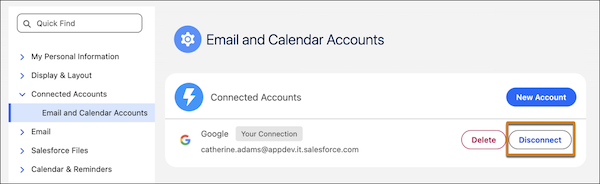
- From personal settings, in the Quick Find box, enter Connected Accounts and select Email and Calendar Accounts.
-
Click Disconnect.
Reset and Turn Off Einstein Activity Capture
EAC configurations set up with user authorization and global authorization must complete this step. After you reset and turn off EAC, you can turn on and set up Momentum.
- From Setup, use Quick Find to search for and select Einstein Activity Capture.
- Select Settings.
-
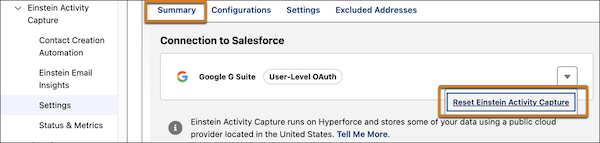
On the Summary tab, from the dropdown menu, select Reset
Einstein Activity Capture.
-
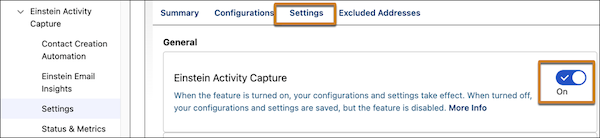
On the Settings tab, turn off Einstein Activity Capture.
After EAC is turned off, you can set up Momentum.