
By default, Momentum uses your connected account’s video platform. Add Momentum Notetaker as a backup to record and transcribe the meeting. Customize Notetaker's appearance and create a custom consent message that attendees see when they join a recorded meeting. These settings apply to all Momentum configurations.

When you use Notetaker, it automatically joins scheduled calls for your users and records the session. The recording and transcript appears on the Video Call record home of the event owner and in the Momentum Call Library.
- From the gear icon, select Salesforce Go.
- On the Salesforce Go Home page, search for and select Momentum.
- Go to the Unlock Advanced Functionality section.
- For Customize Momentum Notetaker Consent Page, click Manage and add your recording consent.
- For Customize Momentum Notetaker, click Manage and give your Notetaker a unique name and avatar.
- For Choose Default Recording Method, select how you want to use Notetaker.
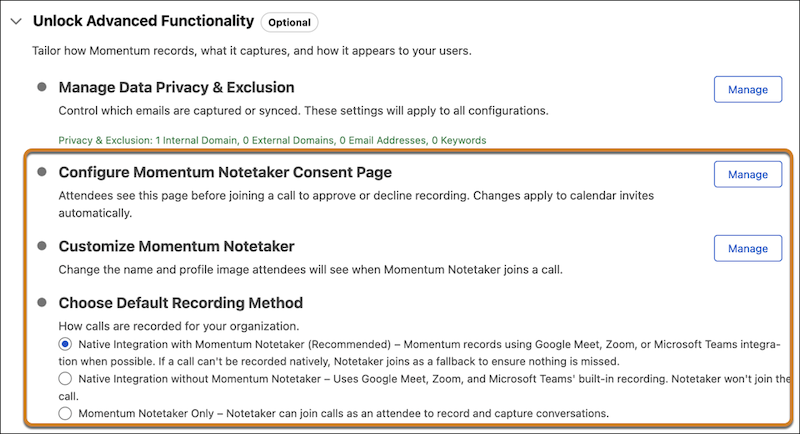
If Notetaker doesn’t automatically join a meeting, users can manually add it to a meeting from the Momentum Upcoming Calls home, even when the default recording method is Native Integration without Momentum Notetaker.
Understand Notetaker’s Appearance Options and Image Guidelines
Add a display name and image to customize how Notetaker appears when joining a call.
- The image should be in JPEG format.
- The image should be 16:9 and the recommended resolution is 1280x720.
- The maximum size is 1.3MB, though we recommend attaching a smaller image if possible.
Understand Notetaker Consent
When you turn on Notetaker consent, each meeting invitee receives a consent link before the call starts. If all invitees accept and consent to recording, Notetaker joins the call. If one invitee doesn’t accept, Notetaker can’t join. The meeting host is notified via email that the meeting isn’t recorded or transcribed.
An external meeting host doesn’t get a consent link. When the meeting is scheduled by an external host, Momentum assumes that the external party is responsible for managing legal responsibilities and data storage of the recording. A consent link might not be sent to ad hoc, unscheduled meeting attendees.
When a calendar event is updated within 15 minutes of the scheduled meeting start, invitees might not receive a consent link.