When a matching rule runs, it applies one or more match key formulas before applying
a comprehensive matching equation. Match keys help to increase the performance of duplicate
rules through a preliminary comparison that narrows the matches to the 100 most likely
duplicate records. Then the rule applies the matching equation only to those likely
matches.
Required Editions
| Available in: Lightning Experience and Salesforce Classic |
| Available in: Essentials, Professional,
Enterprise, Performance, Unlimited, and
Developer Editions
|
In rare instances, match keys result in undetected duplicates, but generally, match keys
greatly improve the performance of duplicate rules.
How Match Keys Are Generated
- The matching equation that determines the arrangement of the fields is rewritten
into a standardized format that translates the OR statements into AND
statements.
- Values for fields in the matching rule are normalized.
- A match key is generated using the field combinations specified in the
standardized field format. A matching rule can have multiple match keys. A
custom matching rule can have up to 10 match keys; you’re prevented from saving
a matching rule that requires more.
- The match key is used to combine normalized field values for each record.
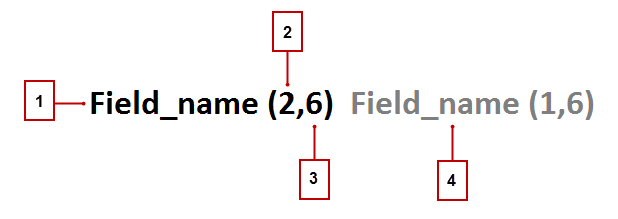
The match key notation shows which fields and which characters in those fields are
used in a match key.
- The field used in the match key (1).
- Number of words (or tokens) in the field value to include in the match key (2).
If no number is present, all words are included.
- Number of characters per word to include in the match key (3). If no number is
present, all characters are included.
- Additional field used in the match key (4).
Match Keys for Standard and Custom Rules
Standard matching rules use predefined match keys. Custom rules that contain standard
field combinations also use predefined match keys. For example, the matching rule
equation for a custom contact matching rule is (First Name AND Last Name AND
Company). A fuzzy matching method is selected for at least one field. The notation
for its match key is: First_Name (1,1) Last_Name Company (2,6).
For nonstandard field combinations, custom rules use keys generated from their
corresponding matching criteria.