
Before your migrating users can use Einstein Activity Capture, they must have an Einstein Activity Capture user permission.
Required Editions
| User Permissions Needed | |
|---|---|
| To assign permission sets: | Assign Permission Sets |
| To create permission sets: | Manage Profiles and Permission Sets |

Important
Depending on the Salesforce licenses that your users have
today, some users have the user permission already. For others, you must assign it manually. In
some cases, additional licenses must be purchased. These considerations could impact when your
users get access to Einstein Activity Capture features and sync. See Considerations for Migrating to Einstein
Activity Capture.
Verify which users still need an Einstein Activity Capture permission assigned to them.
-
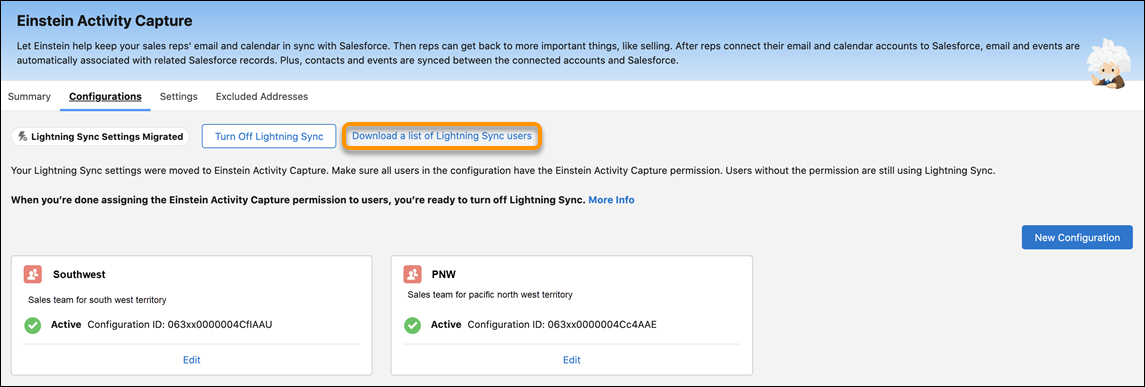
To see a complete list of users, go to the Configuration tab, and click
Download a list of Lightning Sync users.
-
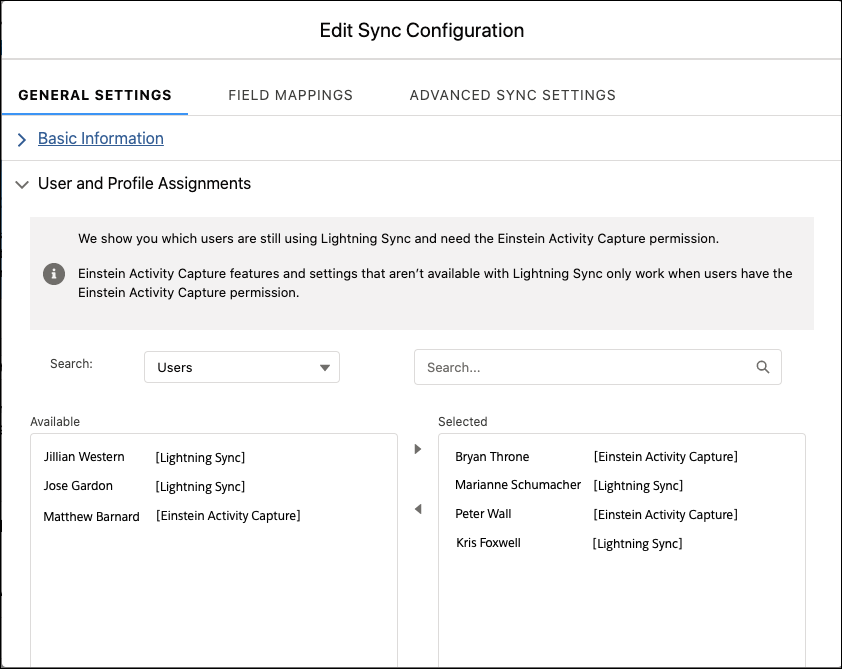
To see users by configuration, open the migrated configuration, and check the User
assignments.
- Users who show [Lightning Sync] after their name must be assigned one of the Einstein Activity Capture user permissions. Those users are still using Lightning Sync.
- Users who show [Einstein Activity Capture] after their name are already assigned one of the user permissions. These users are already syncing using Einstein Activity Capture, and they have access to Einstein Activity Capture features that were added to their configurations.
- Obtain the necessary Einstein Activity Capture user permissions, if you haven’t already.
- Assign Einstein Activity Capture user permissions to the users who need it. See Select Who Can Use Einstein Activity Capture.