
Distribute allocations for quotas, budgets, headcount, and any other metrics that matter to your company by fiscal period in Legacy Sales Planning.
Required Editions
| Available in: both Salesforce Classic (not available in all orgs) and Lightning Experience |
| Available for an additional cost in: Enterprise, Performance, Unlimited, and Developer Editions with Sales Planning in English only, and only if you have Web Services API enabled |
| User Permissions Needed | |
|---|---|
| To allocate metrics: |
Data Pipelines Base User permission set license Data Pipelines Base User permission set AND Sales Planning permission set |

Important
Feature is scheduled for retirement as of Summer'26. See Sales Planning version 1 Retirement
- Open your sales plan.
-
In the Allocation Metrics section, click New. Then enter the details
that apply to the metric that you’re allocating to hierarchy items.
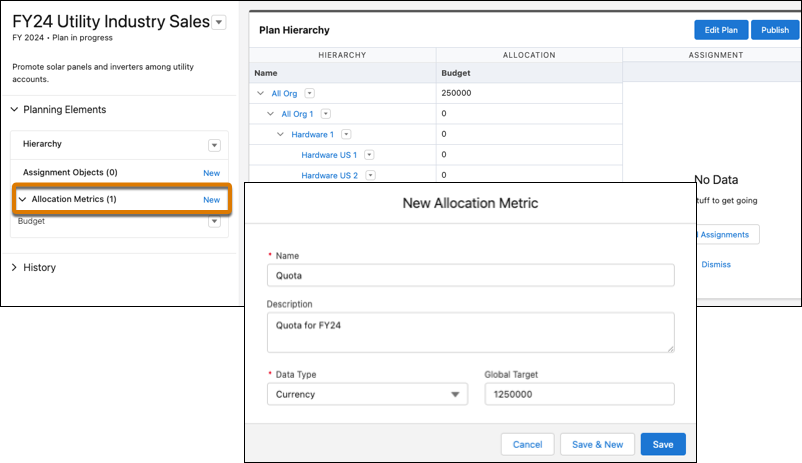
- Save your changes, and then add any other metrics that you plan to allocate.
- To allocate your metrics, click Edit Plan, then select Allocations.
- Select the hierarchy level that you want to allocate to, and then click Allocate.
-
Define how to allocate your metric that you select, and then preview it.
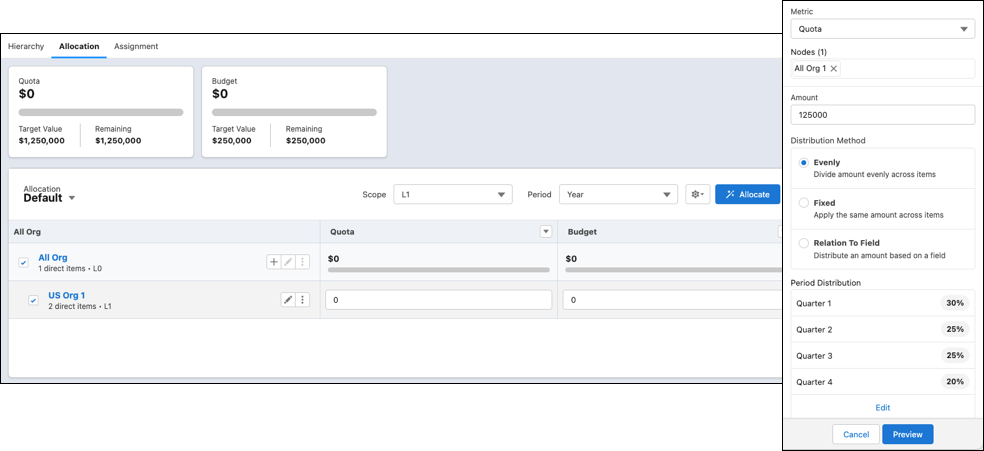
- If the proposed allocations appear the way you want, click Apply. Otherwise, adjust the allocations before you apply them.