Pack up your sales plans in CSV files directly in Legacy Sales Planning. Import that
data into proprietary and third-party systems. Choose the hierarchy level that you export to CSV
files, which can include assignments and allocations.
Required Editions
| Available in: both Salesforce Classic (not available in all orgs) and Lightning Experience |
| Available for an additional cost in: Enterprise, Performance, Unlimited, and Developer Editions with Sales Planning in English only, and only if you have Web Services API enabled |
| User Permissions Needed |
| To export plans: |
Data Pipelines Base User permission set license
Data Pipelines Base User permission
set
AND
Sales Planning permission set
|
-
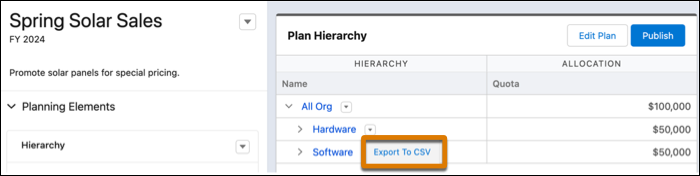
Open the sales plan you want to export.
-
Click next to the hierarchy level you want to include in your CSV file and select
Export to CSV.
Sales Planning includes up to 10,000 records each time you export to CSV files.
-
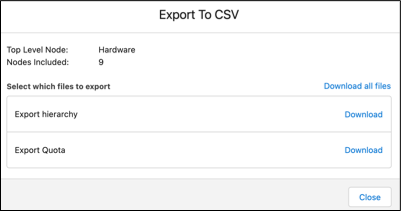
Click Download next to the option that you want to export, such as
hierarchy, allocation metrics, or assignment objects.
Sales Planning downloads a CSV file that you can import into other
systems.