Work only the prospects that matter. Merge duplicate leads using Lightning Experience.
Required Editions
| Available in: Lightning Experience |
| Available in: Starter, Essentials, Group, Professional, Enterprise, Performance, Unlimited, Pro Suite, and Developer Editions with Sales |

Note If duplicate leads aren’t getting flagged, see “Standard Contact Matching Rule and
Standard Lead Matching Rule” in Salesforce Help to learn how Salesforce identifies
duplicate records. Work with your Salesforce admin to fine-tune your matching rules
if necessary.
| User Permissions Needed | |
|---|---|
| To view leads: | Read on leads |
| To merge leads: | Delete on leads |
- Choose a lead record. A message tells you if duplicates exist for that record. To see them, click View Duplicates.
- Choose up to three lead records to merge. Click Next.
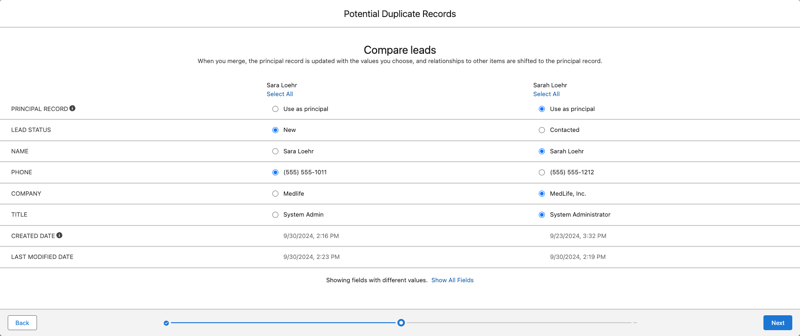
- Choose one lead record as the principal, and choose the field values that you want to keep. Click Next.
- Confirm your choices and merge.