
Microsoft is retiring Exchange Web Services (EWS) in October 2026. Microsoft Graph API replaces EWS and is more advanced, secure, and scalable. Reauthenticate Inbox to use Microsoft Graph with Microsoft Office 365 by October 1, 2026 to continue working without sync disruption.
Required Editions
| Available in: Lightning Experience |
| Available in: Unlimited, Einstein 1 Sales, and Agentforce 1 Sales Editions. Available for an extra cost in Professional and Enterprise Editions. |
| User Permissions Needed | |
|---|---|
| To modify authentication method: |
Customize Application or Modify All Data AND Manage Lightning Sync AND View Setup and Configuration AND Manage Users |
Before you begin, confirm that your Azure admin has granted org-wide Microsoft Graph API access and permissions. See App ID for Microsoft Graph Authentication. The admin setting up the connection from Microsoft is required to be assigned the DirectoryRole of a Global Admin, Cloud Application Admin, or Application Admin.
Starting Spring ’26, Salesforce Inbox configured to use Microsoft Office 365 is automatically authenticated by using Microsoft Graph. If you have configured Salesforce Inbox to use Microsoft Office 365 before Spring ’26, manually upgrade to Microsoft Graph by October 1, 2026. After you upgrade Inbox to Microsoft Graph, users must reconnect to their Microsoft accounts to fully complete the upgrade.
If Einstein Activity Capture is configured in your org and its authentication method hasn’t been upgraded to Microsoft Graph, this upgrade procedure upgrades the authentication method of Einstein Activity Capture and Salesforce Inbox to Microsoft Graph.

- From Setup, in the Quick Find box, enter Inbox, and then select Setup Assistant.
-
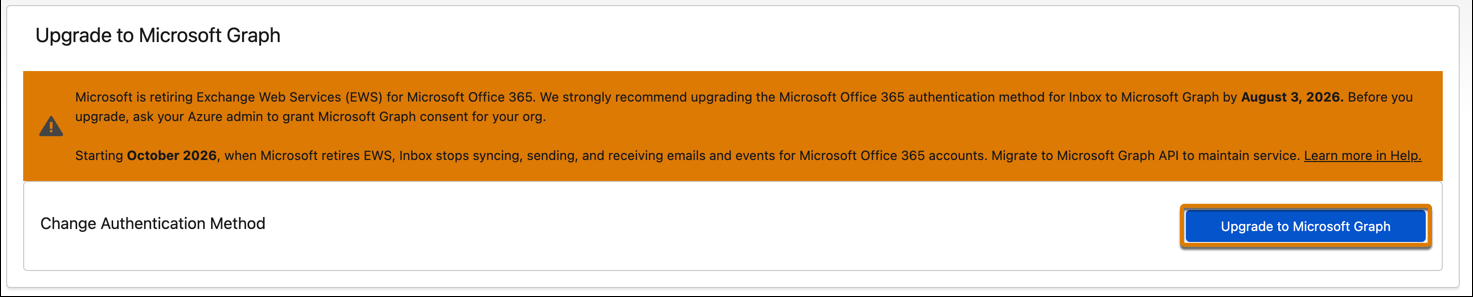
In the Upgrade to Microsoft Graph section, click Upgrade to Microsoft
Graph to start the upgrade.
-
Consent to confirm that this upgrade requires each user to reconnect to their accounts to
fully transition to Microsoft Graph.
If Einstein Activity Capture is configured in the org but hasn’t upgraded to Microsoft Graph, go to Migrate Microsoft 365 Authentication Method to Microsoft Graph in Einstein Activity Capture.
-
Click Finish to complete the upgrade to Microsoft Graph.
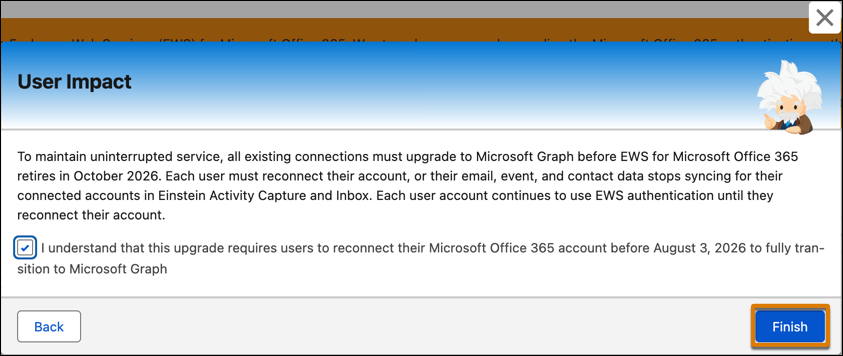
Each user must reconnect their account, or their email, event, and contact data stops syncing for their connected accounts in Inbox. Each user account continues to use EWS authentication until they reconnect their account.