Use cadence steps to test different versions of an email template or a call script to see which is most effective with target prospects. The cadence sends each email or displays each call script according to the proportions that you choose when you build the cadence.
Required Editions
| Available in: Lightning Experience |
| Available with Sales Engagement, which is included with Sales in Performance, Einstein 1, and Unlimited Editions, and available for an extra cost in Professional and Enterprise Editions. Sales Engagement is also available for an extra cost in Service and Lightning Platform. |
| User Permissions Needed | |
|---|---|
| To create and edit cadences: |
Sales Engagement Cadence Creator OR Sales Engagement Cadence Creator Included |
To use variant testing in a cadence, Allow Email Template and Call Script Variant Testing must be turned on in Sales Engagement Setup. In most cases, this setting is turned on by default.
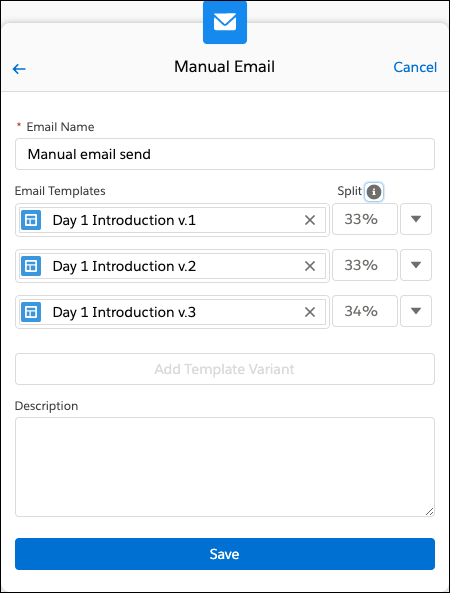
From Sales Engagement Setup, turn on Allow Email Template and Call Script Variant Testing. When managers add an email or call step to a cadence, they can include up to three email templates or call scripts for the step. They can specify the percentage of targets that see or hear each variant.
- Create a cadence or click Modify Steps on an existing cadence record.
- In the Cadence Builder, add an email or call step.
-
Add the first email template or call script that you want to test.
Sales reps who work with the cadence must have access to each email template or call script.
- Click Add Template Variant.
- Choose the second email template or call script that you want to test.
- Add a third variant if needed.
-
For each variant, enter the percent of emails to send or calls to make with each
variant.
The total of your split percentages must equal 100%.
- Save your changes for the email or call step.
After you finish editing a new cadence, click Activate. If you’re editing an active cadence, click Update.

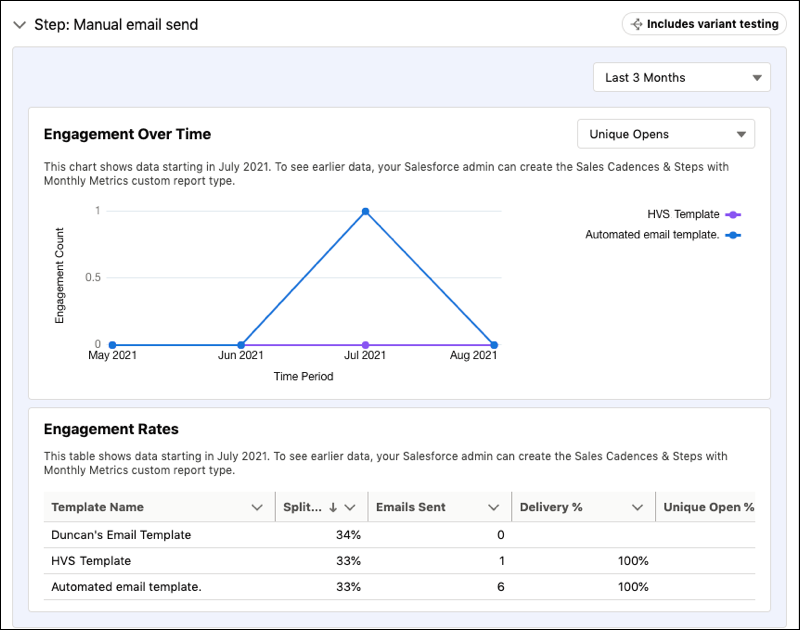
On the cadence record, the Engagement tab shows the amount of target engagement for each variant on each step.