
To create the most accurate forecast possible, apply your judgment as a forecast manager about whether you consider a subordinate’s opportunity part of your forecast. Then you have the details about the total value of the opportunities when you review and adjust the total Commit forecast.
Required Editions
| Available in: Lightning Experience |
| Available in: Professional, Performance, and Developer Editions and in Enterprise and Unlimited Editions with Sales |
| User Permissions Needed | |
|---|---|
| To use Salesforce Forecasting: |
View All Forecasts OR Allow Forecasting OR Delegated forecast manager status |
| To access role-based forecasts in Lightning Experience: | View Roles and Role Hierarchy |
| To apply judgments and adjust forecasts: | Override Forecasts |

As a forecast manager, you can apply judgment to opportunities that your subordinates own. You can’t apply judgments to opportunities that you own that are part of your forecast.
-
On the forecasts page, select the forecast value that you want to review.
The opportunities that roll up to that forecast are shown in the opportunities list.
- In the Manager Judgment field, indicate whether the opportunity is included or excluded from the forecast
- Save your changes.
The total of the opportunities that have closed and opportunities judged as included, or “in,”
the forecast are shown when hovering over the Commit forecast. To see the details, hover over
the  icon.
icon.
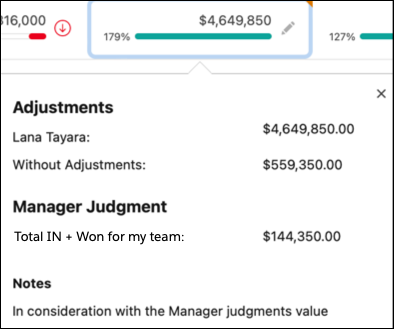
If Salesforce is configured to show adjustment details in columns, hover over the My Commit forecast to see the manager’s judgment Total IN value.