
When you build a prediction in Einstein Prediction Builder, you can also focus your prediction on a specific segment of your dataset. For example, to only look at data for a particular region or industry. With segments, you can get more useful predictions by excluding records that aren’t relevant to your prediction.
-
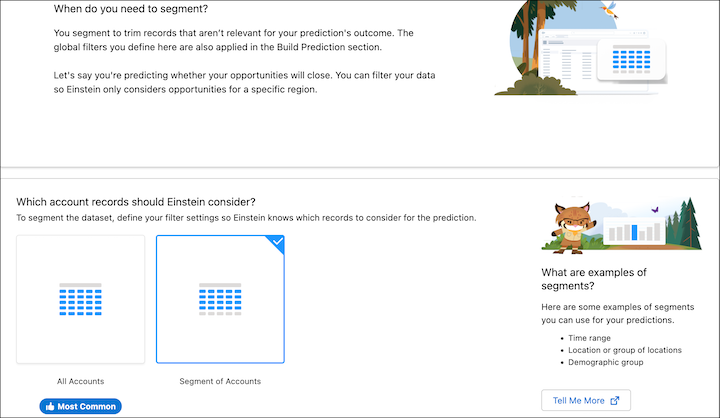
On the Segment page, specify a segment for your object. To define a segment,
select Segment of <Object>, for example, Segment of
Account.
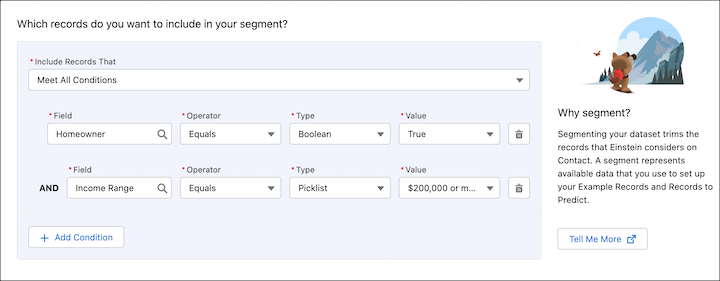
- Select a field, operator, and value. For example, to focus your prediction only on leads in the Food & Beverage industry, select Industry, Equals, and Food & Beverage.
- To add more conditions and further define your segment, click Add Condition. Let's say you want Einstein to focus only on companies with $5 million or more in annual revenue. You enter Annual Revenue, Greater than, and $5,000,000.
-
Specify the logic that you want to use to define the relationship between the
conditions.
- To use the AND operator for all conditions, select Meet All Conditions. For example, you want Einstein to look at all leads in the Food & Beverage industry with an annual revenue of over $5 million.
- To use the OR operator for all conditions, select Meet All
Conditions. Maybe you want Einstein to focus on contacts who are either
homeowners or high income earners.
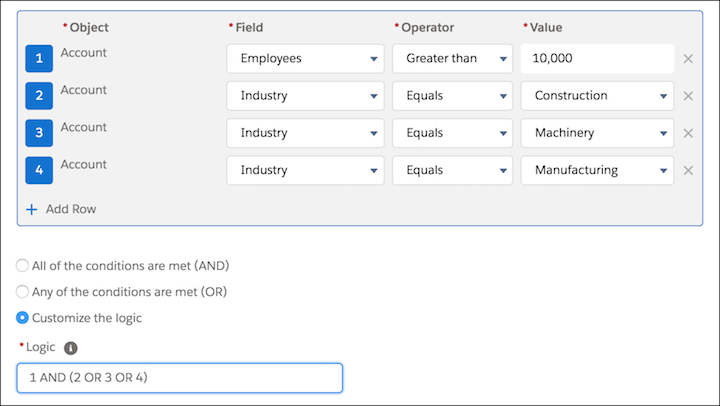
- To use a combination of AND and OR operators to define your segment, select
Meet Custom Condition Logic . For example, to focus your
prediction only on accounts with more than 10,000 employees in the Construction,
Machinery, or Manufacturing industries.
- When you’re done defining your segment, click Save & Next.
