
After you build a prediction and review its scorecard, you can decide whether to enable it. Your Einstein Prediction Builder license gives you a certain number of total and enabled predictions. Disabling predictions frees up space and saves prediction settings for later use.
Why enable a prediction?
Enable your prediction to put it to work. Until a prediction is enabled, it’s not scoring records. But don’t take enabling a prediction lightly. Carefully review the prediction’s scorecard for prediction quality, recommended actions, and other details. See Review Your Prediction’s Scorecard on what to look for in the scorecard.
Why disable a prediction?
- Disabling a prediction frees up space. Perhaps you reached the enabled predictions limit. Or, you want to keep the prediction for future use, but for now, want to make the room to put higher priority predictions to work.
- You can clone and edit a disabled prediction. If you want to change a prediction’s settings that you can’t do in Edit mode (such as its name), clone the prediction. With cloning, you build a new prediction, but instead of starting with a blank slate, you tweak the original settings as needed. You then disable or delete the original prediction.
- When you disable a prediction, you stop scoring records. You can always enable the prediction to use it again.
To enable or disable a prediction:
-
On the Einstein Prediction Builder Setup page, click
 to see
the actions you can take.
to see
the actions you can take.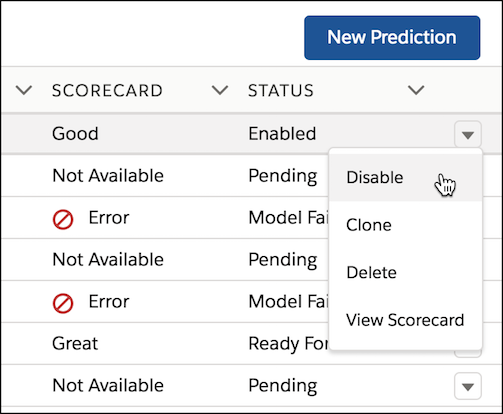
- Click Enable or Disable.