
View contact activity and engagement metrics, see insights, and update and act on records, all in one place in the Contact Intelligence View.
Required Editions
| Available in: Lightning Experience |
| Available in: Professional, Enterprise, Performance, and Unlimited Editions with Sales |
| User Permissions Needed | |
|---|---|
| To view the Contacts tab: | Read on contacts |
| To view contacts: | Read on contacts |
| To create contacts: | Create on contacts |
To see the Intelligence View, go to the Contact home page and click Intelligence View. To return to the original list view, click List View.
In the Contact Intelligence View, you can quickly filter your contacts, see aggregate activity statistics for the resulting records, and email or call contacts. The Last Activity column shows you the due date of the contact’s most recent task or the date of their most recent event.
To see detailed activity for individual records, click the side panel icon next to the record name. The side panel also includes case insights, email insights, and Einstein Conversation Insights.
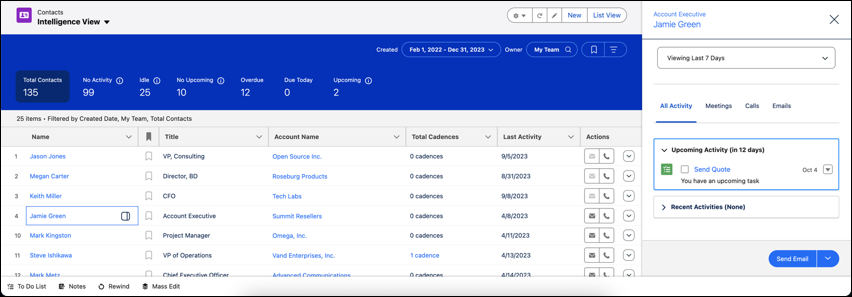
Contact activity metrics include:
- Total Contacts: The total number of contacts that meet your filter criteria.
- No Activity: Contacts with no completed activities.
- Idle: Contacts with past activity, but without completed activities in the last 30 days.
- No Upcoming: Contacts with recently completed activity but no activities scheduled in the next 30 days.
- Overdue: Contacts with activities that are overdue.
- Due Today: Contacts with activities that are due today.
- Upcoming: Contacts with activities that are due in the next 30 days.
Activity metrics include both events and tasks.
Engagement metrics include:
- Not contacted
- Contact attempted
- Engaged
- Meeting scheduled
- Meeting declined
- Disqualified
To see the Contact Intelligence View, your Salesforce Administrator must turn it on in Setup. Then, they must add the Intelligence View button to the Contact List View button layout.