
Make the most of your AI workflows for your conversation data by considering these best practices and nuances.
Required Editions
| Available in: Lightning Experience |
| Available in Einstein Conversation Insights, which is available in Starter, Pro, Enterprise, Performance, Unlimited, and Agentforce 1 Sales Editions |
General post call automation recommendations
Make sure to wait until transcripts and insights are available before using them in flows or other places. This can take hours if you’re trying to access processed transcripts. For faster access to transcripts, you can set the transcript type to the Raw transcript type instead. The Raw transcript type is limited to video calls only.

Permission issues can prevent users from accessing the transcript or call data. Make sure the user calling the action has access to the voice or video call.
The same guidelines with using ECI in general apply to post call automation. For example, video calls must be over a minute long to be processed.
Add actions that run asynchronously and before database saves when creating flows
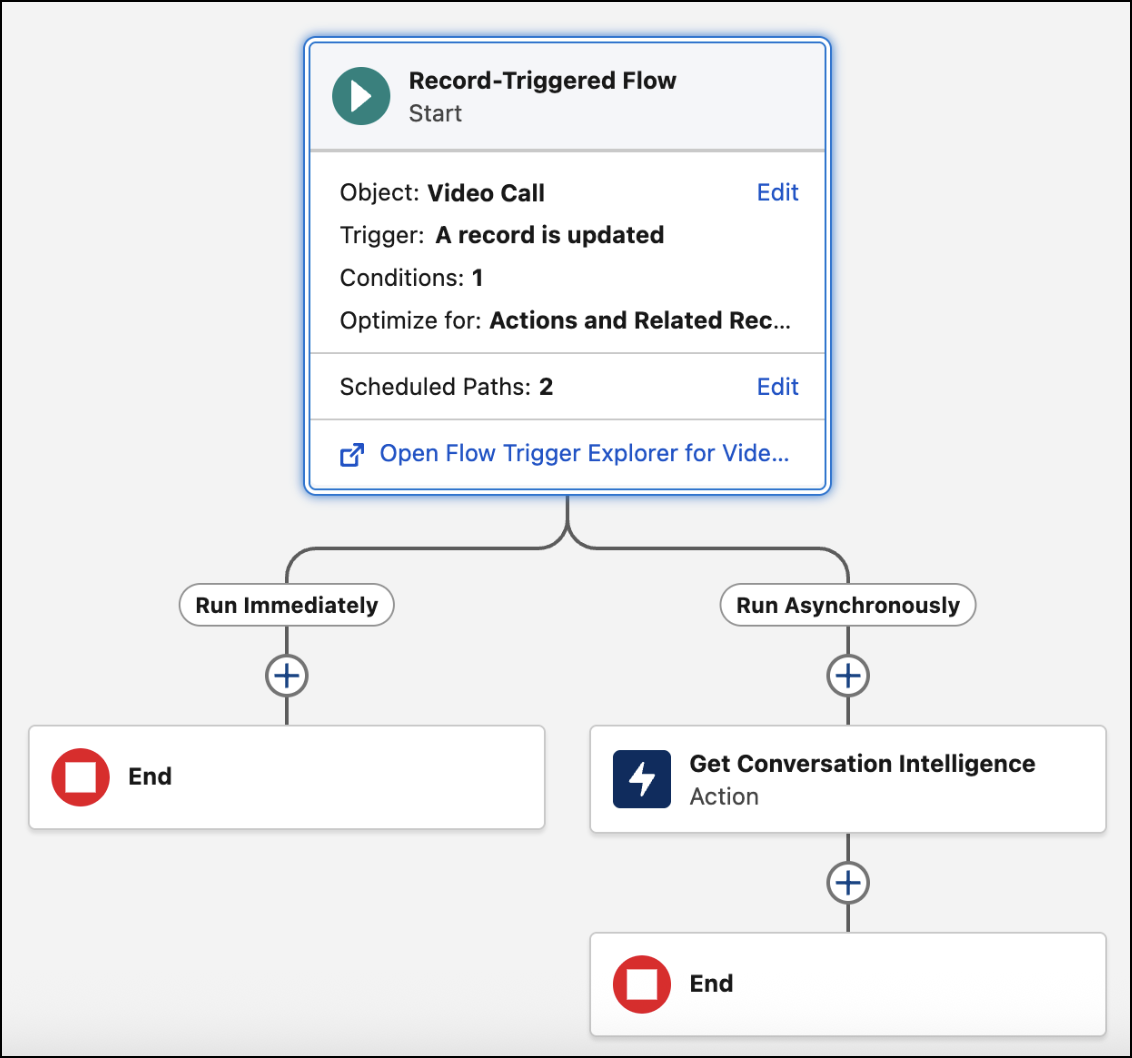
Have actions in flows run asynchronously instead of scheduling them to run immediately. This can help ensure that the transcript, insights, and other elements are processed and available.
Another benefit of actions that run asynchronously is error handling. If there are any errors, we run the risk of losing data in synchronous paths. Asynchronous paths don’t have that problem.
Make sure to add conversation actions in a flow before saving to the database. We retrieve conversation data from external sources, so adding actions after database saves can interfere with obtaining transcripts and insights.
Getting conversation data into Prompt Builder
Using ECI invocable actions directly in Prompt Builder is limited. However, you can create a flow that’s triggered by a prompt, and use the conversation actions there.
Take advantage of out of the box flows
Two types of flows related to call transcripts are available out of the box:
- Get Call Transcripts to Ground Data for Emails
Retrieves the call transcript for a voice or video call and builds a set of grounding data for email prompts.
- Post Call Recap Emails
Sends a recap of a call as an email to internal users who participated in the call. This flow is available as an example template and needs to be customized in order to be used by your sales teams.
You can access these flows from the Flows page in Setup, and modify them in Flow Builder.

You can leverage these flows in places like Prompt Builder. Your reps can then use ECI data to help draft sales emails or post-call recap emails.
To use these flows, enable the feature from the General Settings page under Einstein Conversation Insights in Setup.