
Like all Salesforce objects, your sharing model governs campaigns access. To make sure that the right colleagues have access to the right campaigns, a campaign owner or Salesforce admin can extend sharing for your own campaigns one by one.
Required Editions
|
Available in: Salesforce Lightning Experience and Salesforce Classic Available in: Professional, Enterprise, Performance, Unlimited, and Developer Editions |
| User Permissions Needed | |
|---|---|
| To view campaigns: | Read on campaigns |
| To share campaigns: |
Read on campaigns AND Marketing User selected in User Detail AND Campaign Owner on the record |
A campaign’s members and related assets are also governed by org-wide sharing settings. A campaign owner can share a campaign with another user who can’t access certain related records.
When org-wide sharing settings are set to Public Full Access, the sharing options don't appear on individual campaigns because they can't be shared further.
-
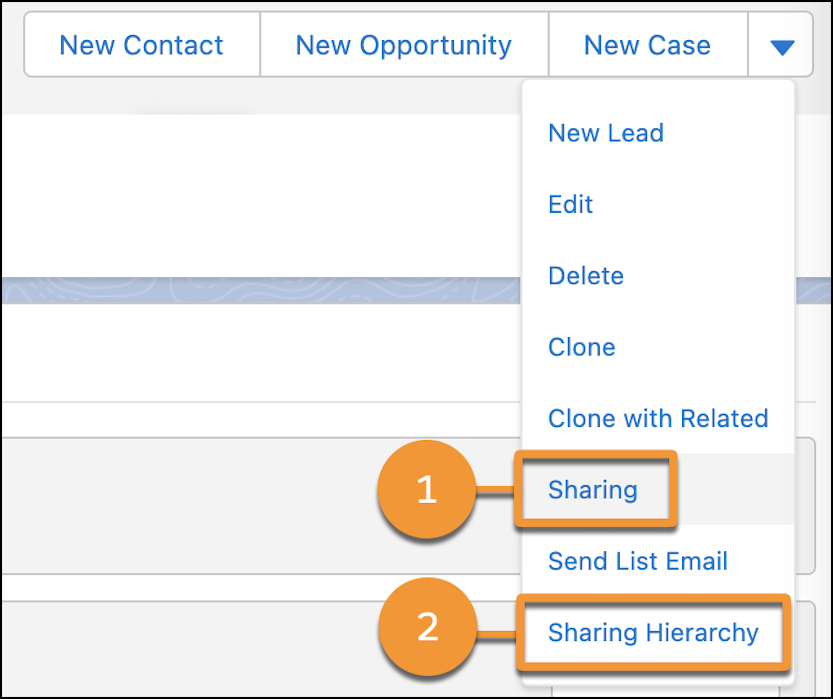
Open a campaign record and click Sharing (1).
- Click Add, and then select a user, group, role, or territory.
- Save your work.
To view everyone with access to the campaign, open the action menu and select Sharing Hierarchy (2).