
You can track campaign influence manually by adding it to the Campaign Influence related list. When you add to a campaign manually, you don’t select a specific contact, so names and campaign member statuses aren’t shown.
Required Editions
| Available in: Salesforce Classic |
| Available in: Salesforce Professional, Enterprise, Performance, Unlimited, and Developer Editions |
| User Permissions Needed | |
|---|---|
| To view the Campaign Influence related list: |
Read on campaigns AND Read on opportunities |
| To manually add influential campaigns: |
Read on campaigns AND Read and Edit on opportunities AND Marketing User selected in User Detail |

Note This information applies only to Campaign Influence 1.0 and not to Customizable Campaign Influence.
- Open an opportunity record.
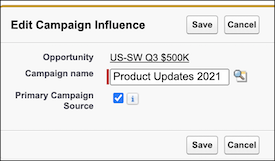
- Find the Campaign Influence related list, and click Add to Campaign.
-
Enter a campaign name or use the lookup.
-
To allocate 100% of the influence to a campaign, select Primary Campaign
Source.
You can select only one campaign as the primary campaign source. To change the selection, deselect the checkbox on one campaign so that you can add it to another.