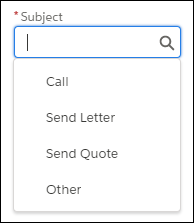
Reps can create tasks and events faster with predefined subject values. A Salesforce
admin defines subject values based on what’s most useful to reps.
Required Editions
| Available in: All Editions |
When reps create tasks and events, they can choose a predefined subject, such as Call, Send
Letter, or Send Quote.
These subjects let reps organize and sort their tasks based on what the tasks are. Without
having to enter the type of task, reps can focus on adding details to describe the task.