
To help you prioritize your records based on activity and opportunity data, the Account Intelligence view adds more capabilities to the standard list view. See account activity, scan vital opportunity metrics, review cases, and log activities, all in one dedicated workspace.
Required Editions
| Available in: Lightning Experience |
| Available with Sales in: Professional, Enterprise, Performance, and Unlimited Editions |
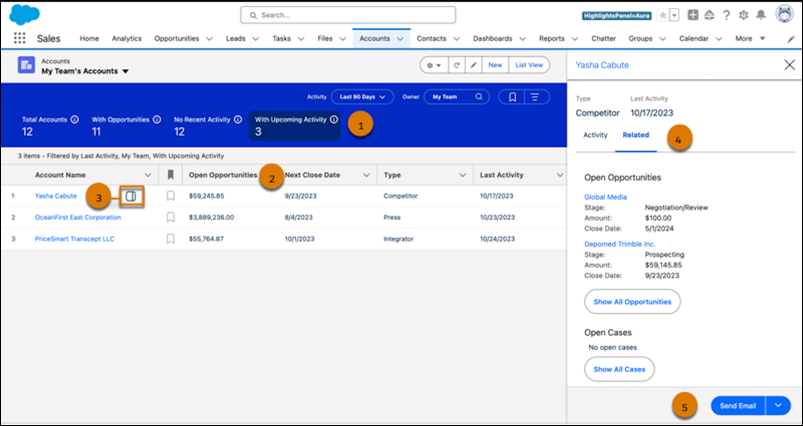
You can quickly filter your accounts with one click (1), see opportunity metrics at a glance (2), and identify recently active accounts in one dedicated workspace. To see detailed activity and related records for individual accounts, click the side panel icon (3) next to the account name. Review related case and opportunity records (4), log tasks or send emails (5) right from the side panel.
Account metrics include these details.
- Total Accounts: The total number of accounts that meet your filter criteria.
- With Opportunities: The number of accounts with open opportunities.
- No Recent Activity: The number of accounts with no activities completed in the last 30 days.
- With Upcoming Activity: The number of accounts with activities scheduled in the next 30 days.
Personalize your list view by creating filters and selecting which fields to show. To ensure your filter criteria persist, set them in the filter panel with the with the Show Filters button.
- Considerations for the Account Intelligence View
Get the most out of the Account Intelligence view by first reviewing some important considerations. - Guidelines for the Account Intelligence View
Streamline your workflow by keeping a few guidelines about the Account Intelligence view in mind. - Turn On the Account Intelligence View
To view account activities, see vital account metrics, and access related records in one dedicated workspace, turn on the Account Intelligence view.