
Reset the feature to change the email and calendar service that you use with Einstein Activity Capture or the authentication method used in the connection. To use Einstein Activity Capture after a reset, complete the setup process again.
Required Editions
| Available in: Lightning Experience |
| Available with Einstein Activity Capture Standard in Sales in Starter, Pro Suite, Professional, and Enterprise Editions |
| Available with Unlimited Edition, Einstein 1 Sales Edition, and Agentforce 1 Edition |
| Available with Einstein for Sales, which is included in Einstein 1 Sales Edition and available for an extra cost in Enterprise and Unlimited Editions |
| Available with Sales Engagement, which is included with Sales in Performance and Unlimited Editions, and available for an extra cost in Professional and Enterprise Editions |
| Available with Revenue Intelligence, which is available for an extra cost in Enterprise and Unlimited Editions |

| User Permissions Needed | |
|---|---|
| To reset Einstein Activity Capture: | Customize Application or Modify All Data |
| To view the Einstein Activity Capture setup pages: |
View Setup and Configurations and Customize Application or Modify All Data |
- From Setup, enter Einstein Activity Capture in the Quick Find box, and then select Settings.
-
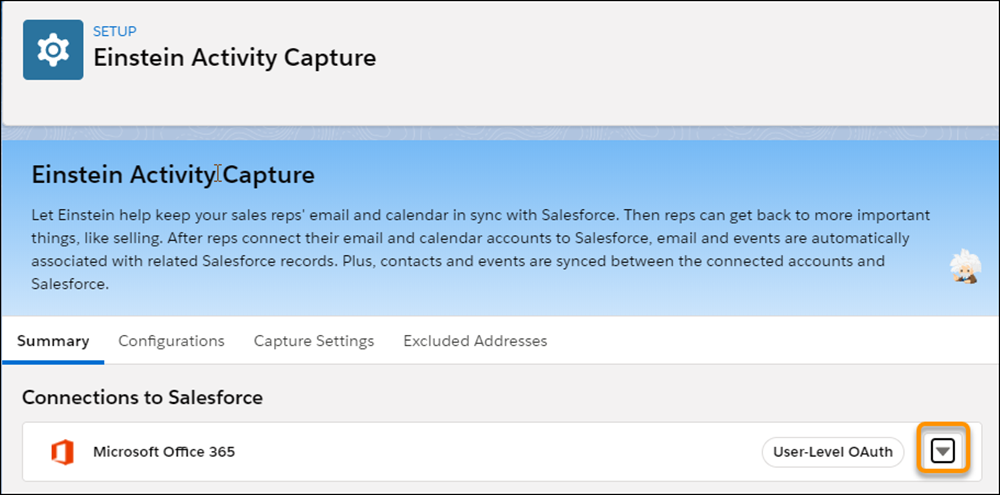
From the dropdown next to the connection method, select Reset Einstein Activity
Capture.
When you reset Einstein Activity Capture, your selected email and calendar service is removed. Your configurations and settings are deleted. Contacts and events stop syncing for all users. User-level connections remain and continue to be used for capturing emails, events, and contacts. To use Einstein Activity Capture after a reset, follow the setup process as if it were your first time using it.
Resetting Einstein Activity Capture doesn't delete previously captured data. All emails, activities, contacts, and event records captured before the reset are retained. If Sync Email as Salesforce Activity isn't enabled, Salesforce deletes data only when it exceeds the retention period or through explicit delete requests (for example, for GDPR compliance). If Sync Email as Salesforce Activity is enabled, new emails stop syncing when your org reaches the storage limit.