
The group’s owner or manager can enable email and event sharing for private and unlisted Chatter groups. Then, Einstein Activity Capture users within the group can share their emails and events with all group members.
Required Editions
| Available in: Lightning Experience |
| Available with Einstein Activity Capture Standard in Sales in Starter, Pro Suite, Professional, and Enterprise Editions |
| Available with Unlimited Edition, Einstein 1 Sales Edition, and Agentforce 1 Edition |
| Available with Einstein for Sales, which is included in Einstein 1 Sales Edition and available for an extra cost in Enterprise and Unlimited Editions |
| Available with Sales Engagement, which is included with Sales in Performance and Unlimited Editions, and available for an extra cost in Professional and Enterprise Editions |
| Available with Revenue Intelligence, which is available for an extra cost in Enterprise and Unlimited Editions |

Note We’re reorganizing the Einstein Activity Capture documentation. We’re
moving some information around, but we aren’t deleting anything.

Important If Sync Email as Salesforce Activity is enabled, synced emails
and events follow the activity sharing rules configured for your org. Activity Sharing
procedure described here is no longer applicable.
- Click the Groups tab.
- Create or update a group.
-
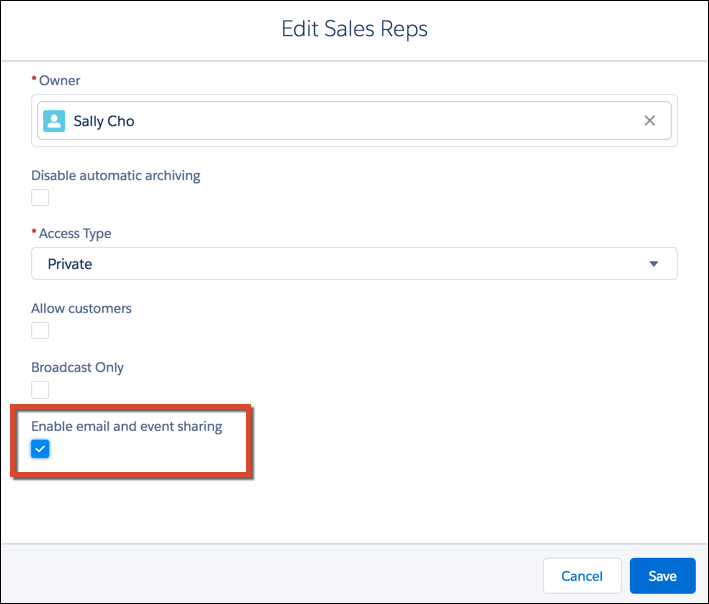
Select Enable email and event sharing. If this option isn’t
available, ask your Salesforce admin to add it to the group layout.
-
Save the group.
Group members who use Einstein Activity Capture can share their emails and events with all group members. Email and events appear in the activity timeline of related records, not in Chatter group feeds.