
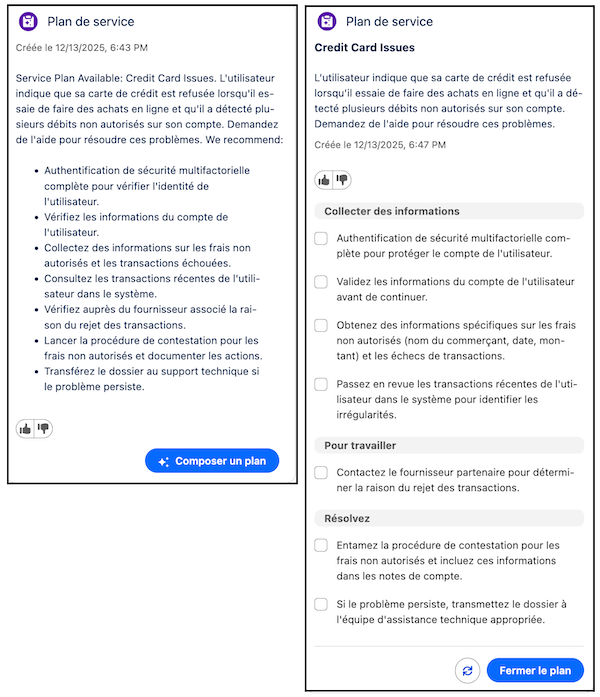
Have service reps work Cases faster using service plans that are translated into their preferred language. When service reps draft a service plan, the plan is generated in your company’s preferred language. Additionally, when have Real-Time Translations enabled, the service plan is then translated into the service rep's preferred language.
Where: This change applies to Lightning Experience in Enterprise, Unlimited, and Developer editions.
- Translation of service plans into your company’s default language is available with Einstein for Service, Agentforce for Service, and Agentforce 1 editions.
- Translation of service plans into your service reps preferred language is available only with Agentforce for Service and Agentforce 1 editions.
Who:
- Translating and viewing service plans in your company’s preferred language is available for all users by default.
- To turn on Real-Time Translations for Service Assistant, Salesforce admins need the Service Planner Builder permission set.
- To view service plans in their preferred language, service reps need the Service Plan Translation and Service Plan User permission sets.
Why: Previously, service plans only supported English, which slowed down service reps who weren't fluent in English. Now, service plans are translated to provide native-language clarity so service reps work faster and efficiently. Specifically:
- Service Assistant automatically drafts service plans in your company's preferred language when the language is supported in Prompt Builder. See Supported Languages in Prompt Builder.
- When the Real-Time Translations feature is turned on, Service Assistant translates service plans into your service reps’ preferred language. Service Assistant supports the same languages as Real Time Translations. See Real-Time Translations.
How:
- Translation of service plans into your company’s preferred language is automatically enabled. However, the language must be a part of the Prompt Builder supported languages.
- To turn on Real-Time Translations, go to the Real-Time Translations Setup page and turn on the feature for Service Assistant. After, assign your service reps the Service Plan Translation permission set.