
Learn about improvements to Lightning Out 2.0 and the Lightning Out 2.0 App Manager.
Where: This feature is available in Lightning Experience in Professional, Enterprise, Performance, Unlimited, and Developer editions.
Why: Lightning Out 2.0 includes these enhancements.
- In the Lightning Out 2.0 App Manager, you can now add the domain names of the external apps that host your Lightning Out 2.0 app. In Setup, also add the domain names to the Trusted Domains allowlist on the Session Settings page.
- In the Lightning Out 2.0 App Manager, you can now add Lightning web components (LWC) with
complex namespaces, such as those with mixed casing. For example,
complexNs/lwcComponentis an LWC component with a valid complex namespace. - In the Lightning Out 2.0 App Manager, to separate the namespace from the component name, you
can now use a forward slash (/) or a hyphen (-). If you use a hyphen, separate the segments of a
complex namespace with an underscore (_). For example,
complexNs/lwcComponentandcomplex_ns-lwc-componentuse equivalent, valid syntax. - The Lightning Out 2.0 app component now supports the
app-idattribute, which is the ID of the Lightning Out 2.0 app. The Lightning Out 2.0 app code block in the Lightning Out 2.0 App Manager automatically includes this attribute. Existing Lightning Out 2.0 apps don’t require this attribute.
How:
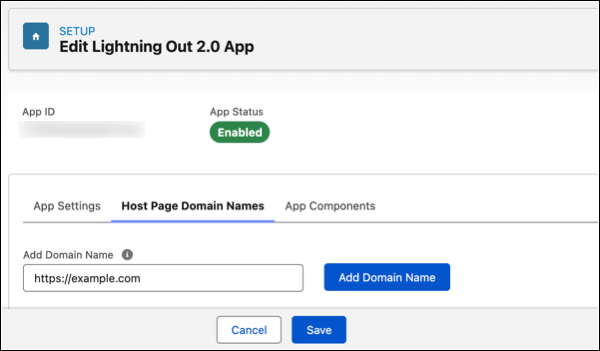
To add the domain name of an external app, open the Host Page Domain Names tab and enter the name. This example shows the https://example.com domain name added to a Lightning Out 2.0 app.
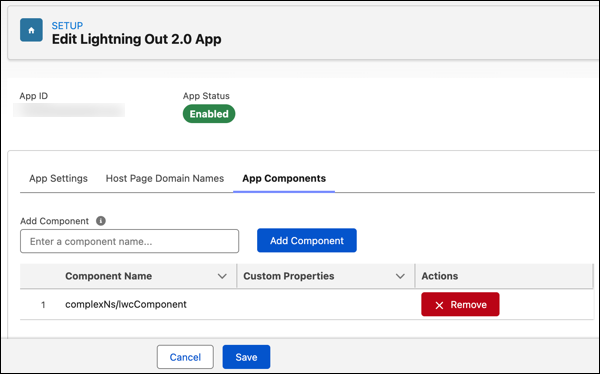
To add an LWC component to a Lightning Out 2.0 app, open the App Components tab and enter the
name. This example shows the complexNs/lwcComponent component added to a
Lightning Out 2.0 app.
Here’s an example of a generated Lightning Out 2.0 code block that includes the
complexNs/lwcComponent component. In the code block, Salesforce converts all
components to the standard syntax for custom HTML elements. The generated code block doesn’t
include the frontdoor_url attribute on the
lightning-out-application component because this attribute is set at run
time.
<!-- Generated Lightning Out 2.0 App Code Block -->
<script
    type="text/javascript"
    async=""
    src="https://MyDomainName.my.salesforce.com/lightning/lightning.out.latest/index.iife.prod.js">
</script>
<lightning-out-application
    app-id="18-DigitSalesforceID"
    components="complex_ns-lwc-component">
</lightning-out-application>
<complex_ns-lwc-component></complex_ns-lwc-componenent>