---
schema_version: "1"
id: 9d6acc59ff1f0047a35c228ac09612dfdc208a8c0bd9fa9a579f28f3d5daa1b4
title: Do More with Lightning Out 2.0 Improvements
collection: admin
version: current
locale: en-us
portal_url: https://docs.salesforce.com/admin/current/en-us/release-notes/260-0-0/rn_lc_lightning_out_updates.md
canonical_url: https://help.salesforce.com/s/articleView?id=release-notes.rn_lc_lightning_out_updates.htm&release=260&type=5
source_site: help.salesforce.com
content_type: documentation
content_hash: 02a19e1ce42090edec510f45bac902f3f103bc6cee33c4333a239a47be5428ae
description: Learn about improvements to Lightning Out 2.0 and the Lightning Out 2.0 App Manager.
products:
- Cross Cloud Packages Solutions
release: "260"
---
# Do More with Lightning Out 2.0 Improvements
Learn about improvements to Lightning Out 2.0 and the Lightning Out 2.0 App Manager.
**Where:** This feature is available in Lightning Experience in Professional, Enterprise, Performance, Unlimited, and Developer editions.
**Why:** Lightning Out 2.0 includes these enhancements.
- In the Lightning Out 2.0 App Manager, you can now add the domain names of the external apps that host your Lightning Out 2.0 app. In Setup, also add the domain names to the Trusted Domains allowlist on the Session Settings page.
- In the Lightning Out 2.0 App Manager, you can now add Lightning web components (LWC) with complex namespaces, such as those with mixed casing. For example, `complexNs/lwcComponent` is an LWC component with a valid complex namespace.
- In the Lightning Out 2.0 App Manager, to separate the namespace from the component name, you can now use a forward slash (/) or a hyphen (-). If you use a hyphen, separate the segments of a complex namespace with an underscore (\_). For example, `complexNs/lwcComponent` and `complex_ns-lwc-component` use equivalent, valid syntax.
- The Lightning Out 2.0 app component now supports the `app-id` attribute, which is the ID of the Lightning Out 2.0 app. The Lightning Out 2.0 app code block in the Lightning Out 2.0 App Manager automatically includes this attribute. Existing Lightning Out 2.0 apps don’t require this attribute.
**How:**
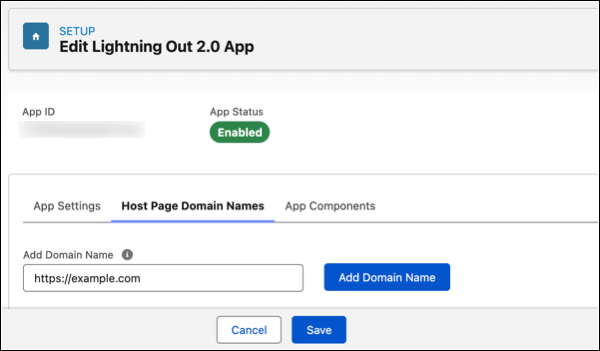
To add the domain name of an external app, open the Host Page Domain Names tab and enter the name. This example shows the https://example.com domain name added to a Lightning Out 2.0 app.
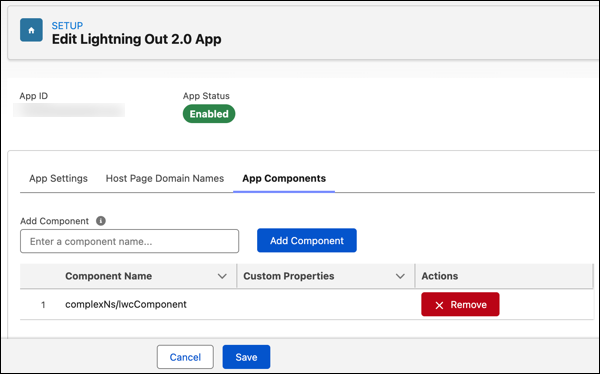
To add an LWC component to a Lightning Out 2.0 app, open the App Components tab and enter the name. This example shows the `complexNs/lwcComponent` component added to a Lightning Out 2.0 app.
Here’s an example of a generated Lightning Out 2.0 code block that includes the `complexNs/lwcComponent` component. In the code block, Salesforce converts all components to the standard syntax for custom HTML elements. The generated code block doesn’t include the `frontdoor_url` attribute on the `lightning-out-application` component because this attribute is set at run time.
```html
```
#### See Also
- [_Salesforce Help_: Extend Salesforce to External Apps with Lightning Out 2.0](https://help.salesforce.com/s/articleView?id=platform.lightning_out_intro.htm&type=5&language=en_US)
- [_Lightning Web Components Developer Guide_: Use Components Outside Salesforce with Lightning Out 2.0](https://developer.salesforce.com/docs/platform/lwc/guide/lightning-out-intro.html)