Some object and user (app and system) permissions are dependent on each other to make
sure that assigned users have the correct access to related data and tasks. When needed,
Salesforce automatically enables dependent permissions in profiles and permission sets to grant
assigned users required object and feature access.
Required Editions
| Available in: both Lightning Experience and Salesforce Classic |
| The available permissions and access features vary according to which edition you
have. |
Whenever you save a profile or permission set, Salesforce evaluates whether dependent
permissions must be enabled as part of the current updates that you’re making or from previous
changes. For example, you previously enabled the View All Records permission for a custom
object in a permission set. You later created a master-detail field for this custom object,
making Account the parent object. Because of this relationship, the View All Records
permission must be enabled for Account as well. The next time you save this permission set,
this Account object permission must be enabled to keep these permission dependencies in
alignment and to fix the broken permission dependency.
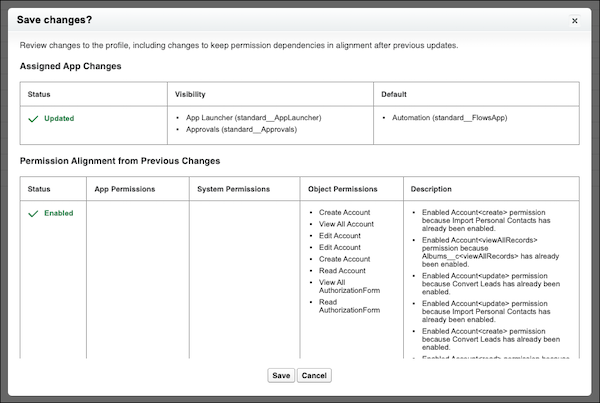
In the enhanced profile user interface, updates that must be made to keep permission
dependencies in alignment after previous changes are surfaced for your review.
In addition, for all profile and permission set alignment changes, whenever permissions are
enabled to keep permission dependencies in alignment after previous changes, these edits are
surfaced in the Setup Audit Trail.