As the template creator, you specify which elements users can edit in pages based on the template.
Required Editions
| Available in: Salesforce Classic |
|
Available for purchase in: Enterprise, Performance, and Unlimited Editions Available (with limitations) in: Developer Edition |
| User Permissions Needed | |
|---|---|
| To build, edit, and manage Site.com sites: |
Site.com Publisher User field enabled on the user detail page AND Site administrator or designer role assigned at the site level |
To make a page element editable in derived pages or child templates, select it on the
page template or in the Page Structure pane ( ) and click
  | Make Editable, or select Editable in the Properties pane
(
| Make Editable, or select Editable in the Properties pane
( ).
).
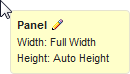
When the page template is open, editable page elements are highlighted with a blue
border on the page. They also display a pencil icon ( ) in
the Page Structure pane and in the information popup that appears when you hover
over the element on the page.
) in
the Page Structure pane and in the information popup that appears when you hover
over the element on the page.