
As a site administrator or designer, when you open a site in Site.com Studio, it opens on the Overview tab. Here you can access and manage the site's components and configure the site's properties.
Required Editions
| Available in: Salesforce Classic |
|
Available for purchase in: Enterprise, Performance, and Unlimited Editions Available (with limitations) in: Developer Edition |
| User Permissions Needed | |
|---|---|
| To build, edit, and manage Site.com sites: |
Site.com Publisher User field enabled on the user detail page AND Site administrator or designer role assigned at the site level |
| To manage domains and publish Site.com sites: |
Site.com Publisher User field enabled on the user detail page AND Site administrator role assigned at the site level |
| To manage user roles: |
Site.com Publisher User field enabled on the user detail page AND Site administrator role assigned at the site level OR Manage Users |
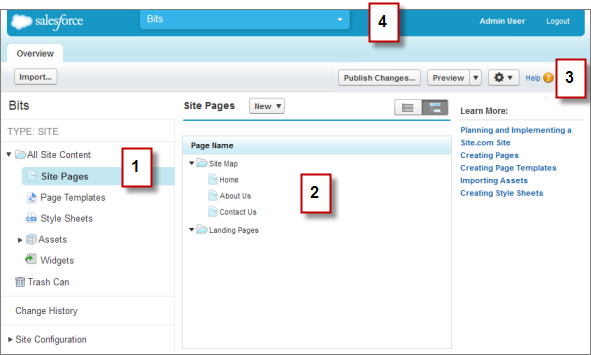
- Select a view (1) on the Overview tab to view its contents (2).
- All Site Content—Create folders to organize your site content. In this view, you can also create pages, templates, and style sheets, and import assets.
- Site Pages—Create site pages, open and edit pages, access
page options, create
site map links, and organize the site map. You can also switch between the default site map
view (
 ) and the
list view (
) and the
list view ( ).
). - Page Templates—Create page templates to base your site pages on, open and edit existing templates, and access template options.
- Style Sheets—Edit the site's style sheet or create new style sheets.
- Assets—Import and manage assets, such as images and files.
- Widgets—Build custom widgets that can you and your team can reuse throughout the site.
- Trash Can—Retrieve deleted items. When you delete a page, template, style sheet, or asset, it goes into the trash can. Deleted items remain in the trash can indefinitely. Retrieved items are restored to their original location. If the original location no longer exists, they are restored to the top-level root directory.
- Change History—View information about recently published files.
- Site Configuration—Configure site properties, add IP restrictions, create URL redirects, manage domain information, manage user roles, and add and manage site languages.
- Use the toolbar (3) to:
- Import assets, such as images and files.
- Publish recent changes.
- Preview your site or generate an anonymous preview link to send to other users.
- Duplicate or export the
site, overwrite
the site with a version from sandbox, or create a new
site (
 ).
).
- Use the site's pull-down menu (4) to:
- Open recently accessed sites.
- View Site.com Studio as your contributors see it to ensure that you set up the view correctly.
- Exit Site.com Studio and return to Salesforce.
- Create a new site.
- Duplicate the site.
