The Site Pages view on the Overview tab contains the pages and site map links of your
website. The Site Map folder reflects the hierarchy or tree structure of your site by
housing site pages and links that are included in the site map. When you create pages or
site map links, they're automatically added to this folder. The Landing Pages folder houses
standalone pages that are excluded from the site map, making it ideal for temporary pages,
such as promotional or competition pages.
Required Editions
| Available in: Salesforce Classic |
|
Available for purchase in: Enterprise, Performance, and
Unlimited Editions
Available (with limitations) in:
Developer Edition
|
When adding a navigation menu to your site, it's important to organize the hierarchy of
your site pages and links accurately, because this structure is used to generate the
menu. Pages and site map links are displayed in navigation menus in the order you
arrange them.
In this representation of the site hierarchy, you can more clearly see the tree
structure.
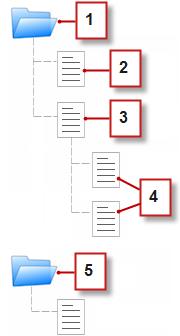
- 1 is the Site Map folder, which contains four site pages.
- 2 is a top-level page in the site hierarchy.
- 3 is a top-level, parent page with two child pages. A child page is a page at a
lower level in the site hierarchy than its parent page.
- 4 are the two child pages.
- 5 is the Landing Pages folder, which contains a temporary page that's not part of
the site map or navigation menu.
- Add Links to a Site Map
Pages aren't the only things you can assign to your site map. Add internal or external URLs to your site map to customize your navigation menus and breadcrumbs, and achieve greater flexibility and control.
- Adding Breadcrumb Navigation to Pages
Add a Breadcrumb page element to your page to help users navigate through your site and show the page’s location in the site hierarchy.
- Add a Navigation Menu
By default, when you create a menu, it's generated from the pages and site map links in the Site Map folder in the Site Pages view. However, you can also create a menu that's generated from the pages in the Landing Pages folder or from the child or sibling pages of a site page.
- Style Navigation Menus
Navigation menus are styled using CSS themes that you can customize to match the design of your website. When you add a navigation menu to a page, it uses a default theme to control its appearance. Choose from other existing themes in the Theme Name dropdown list in the Properties pane.


