
Export one or more site languages as an .xml file that you can send to your translation service.
Required Editions
| Available in: Salesforce Classic |
|
Available for purchase in: Enterprise, Performance, and Unlimited Editions Available (with limitations) in: Developer Edition |
| User Permissions Needed | |
|---|---|
| To add and manage language options: |
Site.com Publisher User field enabled on the user detail page AND Site administrator or designer role assigned at the site level |
-
In the Languages view on the Overview tab, click
 | Export Content for Translation.
- Select the language content that you want to export for translation. (Use CTRL+click to select multiple items.)
- Optionally, enter a different filename. The default name is languages.xml.
- Click OK.
- If required by your browser, choose where to save the file.
After you export the .xml file, you can send it for translation.

Example The .xml file contains a time stamp attribute that records the time of the export,
and encloses all translatable content in CDATA sections, as shown in this example.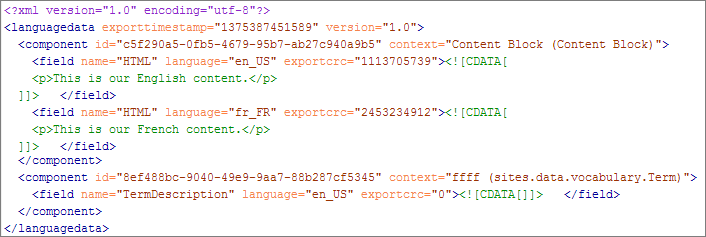
When you receive the translated .xml file, import it back into the site.