
As a contributor, when you open a site in Site.com Studio, it opens on the Overview tab. Here you can access and edit the site's pages and content, and import images and files.
Required Editions
| Available in: Salesforce Classic |
|
Available for purchase in: Enterprise, Performance, and Unlimited Editions Available (with limitations) in: Developer Edition |
| User Permissions Needed | |
|---|---|
| To edit only content in Site.com sites: |
Site.com Contributor User field enabled on the user detail page AND Contributor role assigned at the site level |
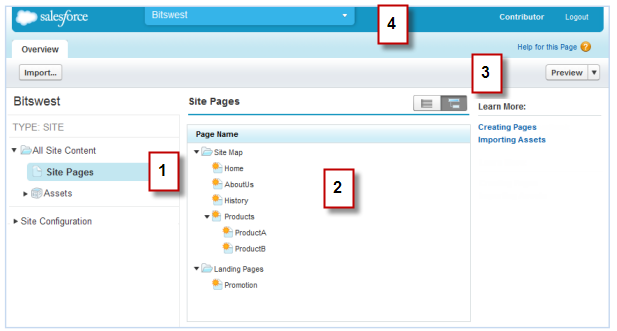
- Select a view (1) on the Overview tab to view its contents (2).
- All Site Content—View all of the site's pages, images, and files.
- Site Pages—View and edit pages or create site pages, if available.
- Assets—Import assets, such as images and files.
- Site Configuration—Manage user roles in the site. This is available only if you have the “Manage Users” perm.
- Use the toolbar (3) to:
- Import assets, such as images and files.
- Preview the site in a browser window.
- Use the site's pull-down menu (4) to:
- Open recently accessed sites.
- Exit Site.com Studio and return to Salesforce.