
When working with data repeaters, data tables, data functions, and forms, you can customize what your site visitors see if an error occurs when connecting to the data source.
Required Editions
| Available in: Salesforce Classic |
|
Available for purchase in: Enterprise, Performance, and Unlimited Editions Available (with limitations) in: Developer Edition |
Additionally, for data tables, data repeaters, data functions, you can customize what's displayed when no data exists for the current query. For example, if you set up a data repeater to dynamically filter and display results based on the user's selection, but there are no results for that selection, you can display an appropriate message to explain what happened.
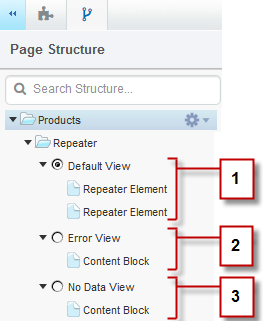
- The Default View (1) is what usually appears on the page. For example, when you add a form to the page, the Default View contains the form's fields.
- The Error View (2) is displayed if an error occurs when connecting to the data source. It contains a content block with a default message that you can customize. You can also add other page elements to the view.
- The No Data View (3) is displayed when no data exists for the current query. It contains a content block with a default message that you can customize. You can also add other page elements to the view.