
Page data connections make it easy for site administrators and designers to create a detail page for a single record when working with Salesforce objects.
Required Editions
| Available in: Salesforce Classic |
|
Available for purchase in: Enterprise, Performance, and Unlimited Editions Available (with limitations) in: Developer Edition |
When combined with repeater elements, custom code, or content blocks, page data connections let you connect to standard and custom objects, retrieve a specific record, and dynamically display the record on a site page.

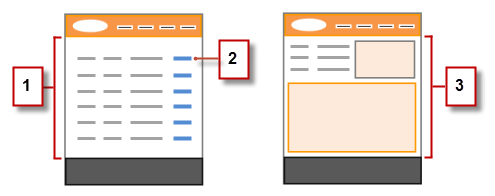
For example, let's say you want to list all of your company's accounts on a site page called Accounts. When a user clicks a View Details link, you want to open a site page called Account Detail to display information for the selected account.
In this case, you could add a data repeater to the Accounts site page to retrieve a list of records from the Account object (1). Using a data element, you could create a View Details link (2) that, when clicked, uses a URL query string to pass the Account ID field as a unique identifier to the Account Detail page. As the Account Details page loads, the page data connection uses the unique identifier value to dynamically return only that record's details (3).
With page data connections, you can use expressions to access the returned data anywhere on the page, including the page's properties. For example, let's say you want to use the account name as the title of the Account Detail page. In this case, you would simply enter {!Name} in the Title field on the Properties pane. When the page loads, it retrieves the account name for that particular record and displays it in the browser's title bar.