Standard and custom objects have relationships that define how records in one object relate to records in another. For example, the Accounts object has a one-to-many relationship with the Contacts object—that is, each account can have one or more contacts associated with it. This relationship is also known as a parent-to-child or a master-detail relationship.
Required Editions

| Available in: Salesforce Classic |
|
Available for purchase in: Enterprise, Performance, and Unlimited Editions Available (with limitations) in: Developer Edition |
Data repeaters, data tables, and data functions take advantage of these relationships to let you display data from related objects on the page.
Access Data in Parent Objects:
When you add a data repeater, data table, or data function to the page and connect it to a standard or custom object, you can automatically access the fields of any parent object it's related to.
If you add filter criteria to a data repeater, data table, or data function, the Field dropdown list in the Create Data Connection dialog box displays the object's fields, followed by the fields of all of its parent objects, which use the format parent_object_name.field_name. This lets you filter results based on a field in the parent object. So for example, when retrieving records from the Contacts object, you could decide to return only contacts where the account name (Account.Account Name) is “ABC Labs.”
Similarly, when you add data elements to a data repeater, or columns to a data table, you can bind them to fields in a parent object. So for example, if you add a data table that's connected to the Contact object, you can add a column that binds to its Full Name field and a column that binds to the Account object's Account.Account Name field to display the contact's name along with the name of the account it's associated with.
Access Data in Child Objects:
You can retrieve data from any child object of a parent object using a data repeater that contains another data repeater, data table, or data function. The outer or parent data repeater connects to an object, such as Accounts. In turn, the inner data repeater, data table, or data function automatically lets you connect to any child objects, such as Contacts. It’s also known as a nested data repeater.
Let's say you want to display a list of accounts along with the names of the associated contacts, similar to this example.
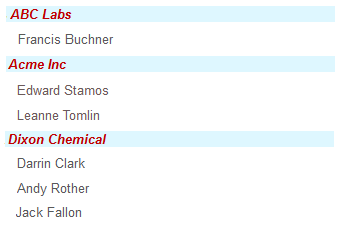
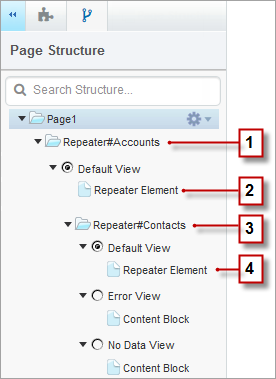
You can achieve this by creating a data repeater (1) that's connected to Accounts, and adding a data element (2) to it that binds to the Account Name field. Then add a nested data repeater (3) that's connected to Contacts, which is a child of Accounts. Finally, add a data element (4) to the nested data repeater that binds to the Contact object's Full Name field.