
As a contributor, you can use the inline editor to edit any editable text areas on the page. Editable areas display a gray border when you hover over the text.
Required Editions
| Available in: Salesforce Classic |
|
Available for purchase in: Enterprise, Performance, and Unlimited Editions Available (with limitations) in: Developer Edition |
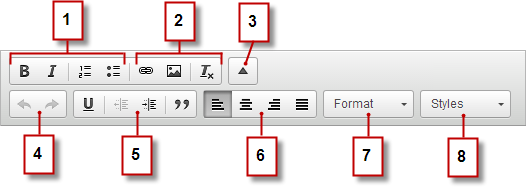
The inline editor lets you:
- Control the text style and layout (1) by:
- Applying bold or italic formatting
- Inserting numbered or bulleted lists
- Add images and hyperlinks, and remove unwanted formatting (2).
- Expand the toolbar (3) to access additional options (4–8).
- Undo and redo your edits (4).
- Control the text style and layout (5) by:
- Applying underline formatting
- Setting text alignment
- Applying blockquote formatting
- Set paragraph indentation (6).
- Apply paragraph and heading styles (7).
- Apply additional styles, such as highlighting (8).

Tip Avoid applying formatting, such as different fonts or highlighting,
directly to text whenever possible. Instead, it’s best practice to use the paragraph
and heading styles to quickly apply consistent formatting throughout the site. Using
paragraph and heading styles also ensures that all page text is updated
automatically if a site administrator or designer modifies these styles.