
Security Insights is an automated tool that generates a risk-prioritized list of security gaps, and helps you decide where risk mitigation efforts should be focused. For example, security analysts can identify and address risky configurations and deviations from best practices, and then recommend setting enhancements that align settings with security policies.
The Security Insights Tab
The Security Insights tab enables you to rapidly review the overall security posture, perform a security review of key metrics, compare existing settings with best practices, customize risk ratings, exclude items, gain improvement insights, view previous results, and print action plans. Key features include:
- Rapidly review the overall security posture within Salesforce.
- Perform a security review of key metrics, which are broken down into six lenses.
- Compare existing security settings against recommended best practices.
- Custom configuration of risk ratings and insight scoring.
- Exclude individual items within graphs, or entire graphs, to align Salesforce to your Org’s security.
- Gain insights for improving your security score by making configuration updates within Salesforce.
- View previous analysis results using the Time Machine.
- Print out an Action Plan as a PDF file to obtain details on improving your score.
Security Insights Categories
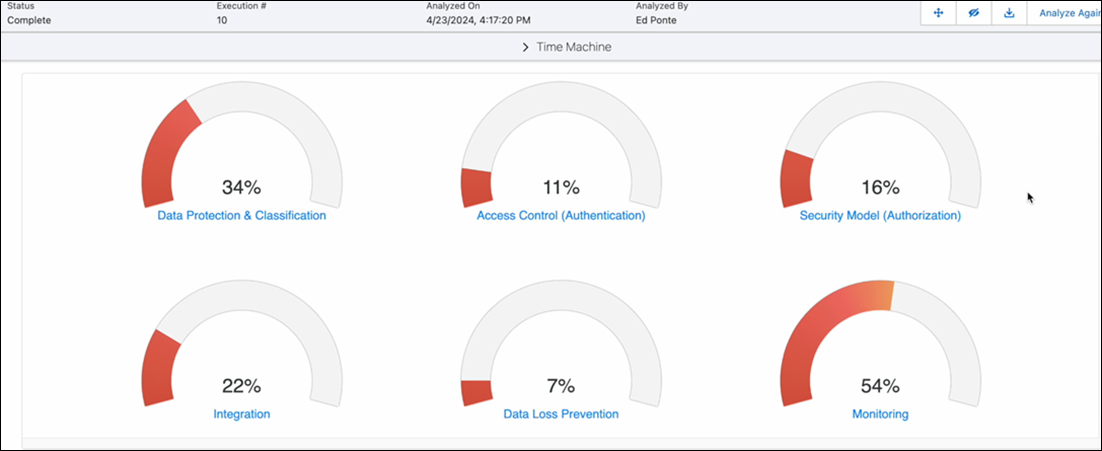
Security Insights categorizes Salesforce security into six lenses through which the org in being analyzed:
- Data Protection
- Integration
- Data Loss Prevention
- Access Control (Authentication)
- Security Model (Authorization)
- Monitoring
The lenses contain a collection of insights, each of which identify potential risks in the configuration of the Salesforce org. Some insights automatically score risks, while others are informational.
The Security Insights tab displays gauges for the six lenses with a percentage score
Running an Analysis
To start a Security Insights analysis, click the Analyze button.
A Security Insights Analysis modal pops up, displaying the current analysis job's progress. The analysis leverages the work done on the Data Classification tab to assess how well sensitive data is protected in the Org. This window can be closed without affecting the job.
The job progress modal can be reopened by clicking the View Progress button.
When the analysis is complete, the Security Insights tab reloads, and the lenses are given scores based on the findings of the analysis.

For every analysis after the initial one, a history report of changes is available. Click View Change Details to review the Detailed Risk Report. You can download the report by clicking Export Detailed Risk Report.
- Security Insights Lens Information and Scoring in Secure
The detailed insight lenses display a set of scores. The scores are based on risk rating for each security insights finding and help in prioritizing what comes first when it comes to remediation activities. - Perform a Guided Risk Assessment
The Guided Risk Assessment focuses on capturing business context for an org, which can then be combined with specific high risk setting observations without requiring extensive data classification, risk rating, and risk scoring configuration. - Include and Exclude Insights from Scoring
You can exclude entire insights or specific entries from an org’s risk-weighted scoring. Excluding an entire insight will omit that insight from being scored within the specific lens. Excluding an individual insight entry will omit the specific entry within the list from being scored. Consider, for example the Data Protection and Clasification lens, which includes an insight called profiles with access to high-risk fields. You can exclude risk profiles that aren't assigned to any user since these profiles don't contribute to the organization’s risk. - Security Insights Lenses in Secure
The Security Insight lenses display a collection of insights, each of which identifies potential risks in the configuration. Customize the UI of the lenses according to your needs. Your customizations are saved for future sessions. - Managing Security beyond Health Check with Secure
Salesforce Health Check provides a basic security overview, but lacks in-depth analysis. Adding Secure offers a more comprehensive assessment including data identification, risk prioritization, and detailed analysis. Using both provides robust data protection. - Create a Read-Only User for Security Insights in Secure
Retain a secure Salesforce environment and reduce the risk of unwanted changes to security settings by designating users as read-only. Give stakeholders access to security insights and permission to download lens-related data, without the ability to run jobs, configure risk ratings, or update scoring policies. - Security Insights Alerts
Security Insights offers alerts that can be created, configured, and subscribed to.