
Provision and link multi-region Own accounts by using the same Master Admin email in each region. Invite users to linked regions with the same email for one credential set, and follow recovery guidance for separate account errors.
Where possible, we change noninclusive terms to align with our company value of Equality. We maintained certain terms to avoid any effect on customer implementations.
Provision Multi-Region Accounts
Users don't create new Own accounts from a self-signup page. Instead, contact Salesforce by using the form at salesforce.com/company/contact-us.
After the Sales Order is signed and approved, Salesforce sets up the account. Backend provisioning registers the Master Admin and sends a welcome email to the Master Admin.
Users get access only through the welcome email that Own sends after account setup is complete.
For multi-region access, Own centralizes authentication across linked regions, so users use one set of credentials across the regions where admins add them.
Adding Regions
Add a secondary region by completing the Salesforce sales provisioning workflow for that region. Own doesn't add regions through a self-service flow.
To add the new region to an existing Own account, provide the same Master Admin email during Salesforce sales provisioning. When the Master Admin email matches, region linking is automatic during provisioning.

After linking a region, the Master Admin or Admin invites users to the region. Each user accesses only the regions to which they're invited. Wait for invitation acceptance and credential setup, before inviting the same email address to another linked region.
Linked-Region Account Structures
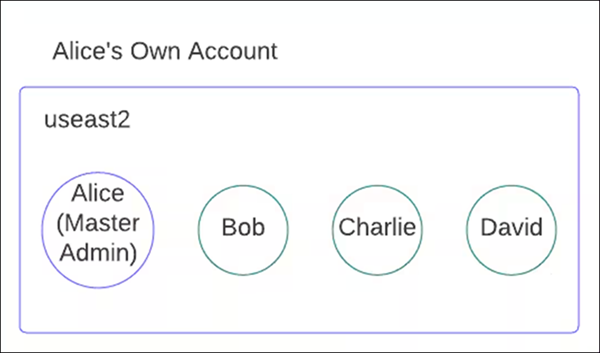
A single-region account before you link a secondary region.
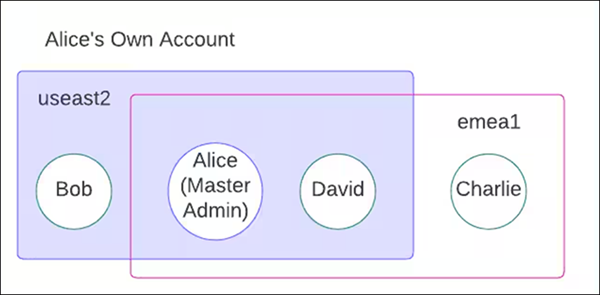
Two linked regions in one Own account under shared multi-region management.
Best Practices and Limitations
Use one consistent Master Admin email when provisioning all regions to ensure they link into one multi-region Own account.
Own doesn't support merging two accounts with different master admins in different regions into a single Platform account.
Only the Master Admin in one region serves as the Master Admin in a different region.
Multiple accounts with one master admin exist only across different regions.
Align password expiration and password history policies across all linked regions.
Apply consistent IP restrictions across all linked regions, or remove restrictions from all regions, to avoid accidental account lockouts.