A standard permission set consists of a group of common permissions for a particular
feature associated with a permission set license. Using a standard permission set saves you time
and facilitates administration because you don’t need to create the custom permission
set.
Required Editions
| Available in: both Salesforce Classic and Lightning Experience |
| Available in: Essentials, Contact Manager,
Professional, Group, Enterprise,
Performance, Unlimited, Developer, and
Database.com Editions
|
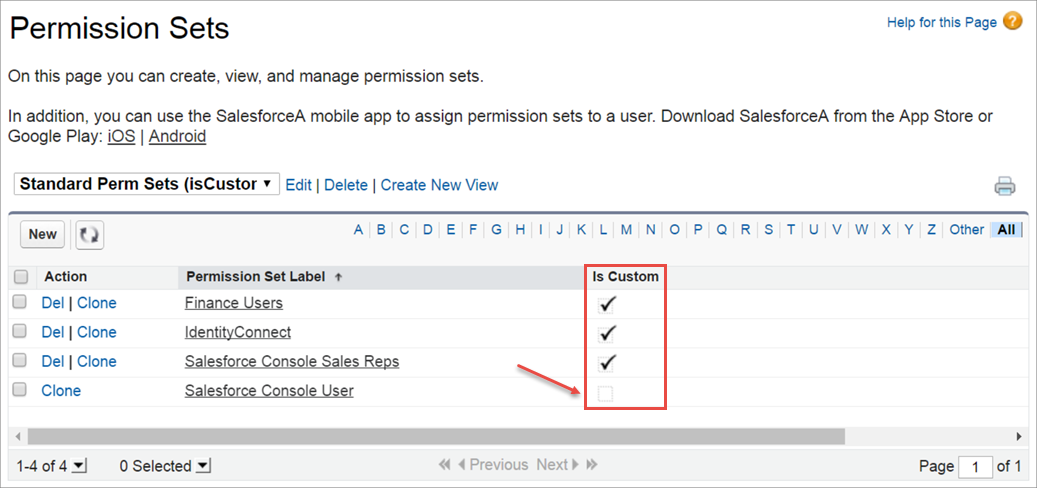
To see which permission sets are standard, add Is Custom to your list
view. The Is Custom box isn’t checked for standard permission set. Permission sets you created
or cloned are indicated with a checkmark.
Salesforce can update the permissions and settings in a standard permission set to account
for new features or functionality. When this occurs, the Last Modified By field displays
"salesforce.com, inc." and the timestamp for the update.
You can see all permissions enabled for a standard permission set on its summary page. Select
a permission set, and then click View Summary.
Standard permission sets don’t count against your org’s permission set limits. You can clone
a standard permission set as many times as you want, but you can’t edit it. Clones do count
against your org’s permission set limits.

