
A MuleSoft step asynchronously runs an operation imported from a MuleSoft API and has no user interaction. You can control when a MuleSoft step is ready to start.
Required Editions
| View supported editions for Flow Orchestration. |

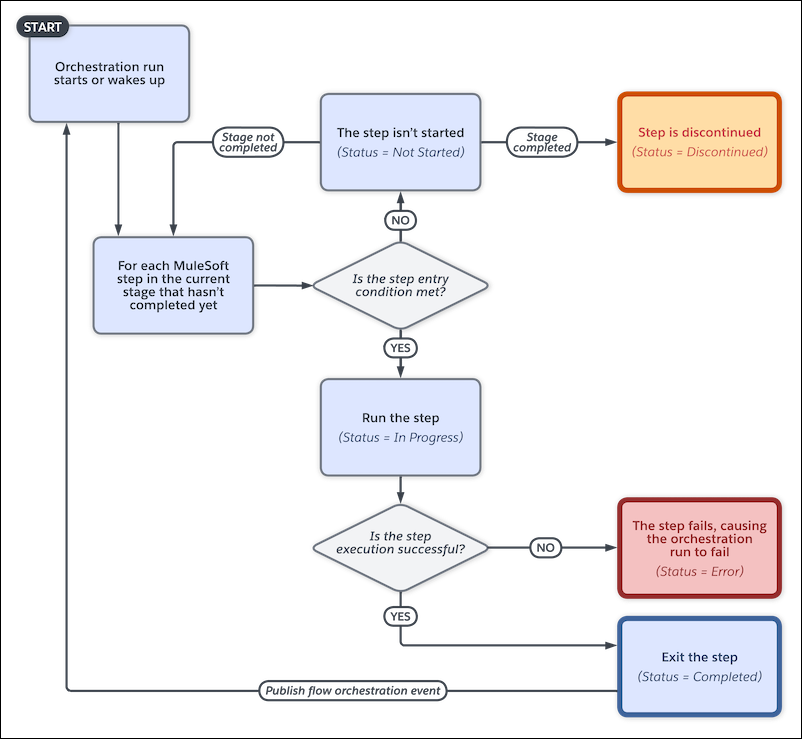
MuleSoft Step Work Cycle
When to Start the Step
To control when a MuleSoft step starts, under Select When to Start the Step, select a condition.
| Step Condition | Requires |
|---|---|
| When the stage starts, the step starts | — |
| When another step is marked Completed, the step starts | The name of the step that must be completed before the step can start |
| When the specified requirements are met, the step starts | Up to 10 requirements that determine whether the step can start |
| When the specified evaluation flow returns True, the step starts | The name of the active evaluation flow that determines whether the step can start |
Running Context of a MuleSoft Action Called by a MuleSoft Step
For API version 60.0 and later, by default, a MuleSoft action called by a MuleSoft step runs in the context of the Automated Process User. To run a MuleSoft action in the context of a different user, use the Select Who to Run the Action As section in the MuleSoft step's Properties panel.
For API version 59.0 and earlier, a MuleSoft action called by a MuleSoft step runs in the context of the user that the orchestration ran as before the MuleSoft step starts.