
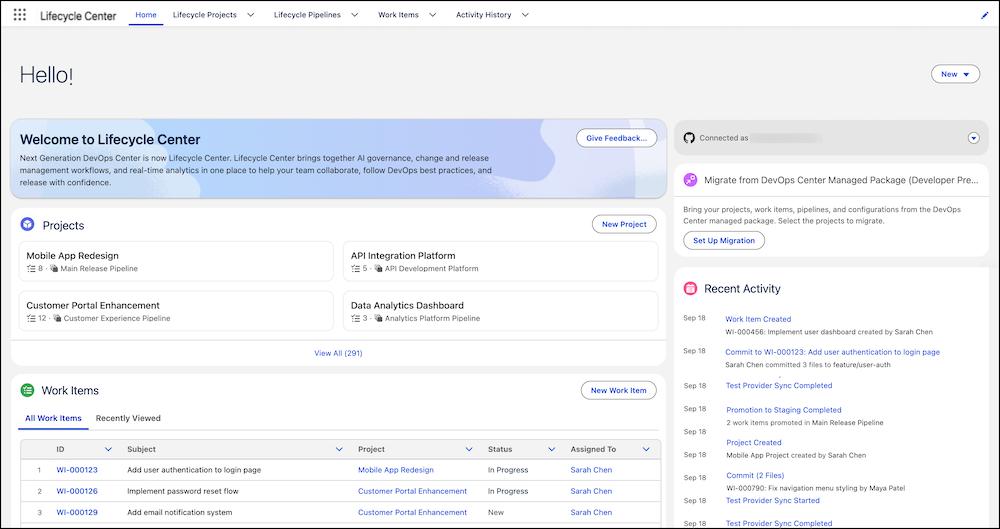
Lifecycle Center (formerly next-generation DevOps Center) brings modern DevOps best practices to your team with an AI-powered, click-based user interface (UI). Built on the principles of DevOps Center (Managed Package), Lifecycle Center serves as a central development hub where your team can collaborate—with built-in governance that keeps coding agents and users safe and compliant.
Required Editions
| Available in: Lightning Experience in Professional (API access required), Enterprise, Performance, Unlimited, and Developer Editions |
| Not available in: Government Cloud Plus. Contact your Salesforce account executive for more details. |
| Not available in: EU Operating Zone. EU Operating zone is a special paid offering that provides an enhanced level of data residency commitment. Lifecycle Center is supported in orgs in the EU that aren't part of EU OZ, per standard product terms and conditions. |
Lifecycle Center uses source control as the single source of truth for your team. Lifecycle Center MCP tools, available through Salesforce DX MCP Server, provide AI-based recommendations for work item management, conflict resolution, and deployment failure resolution. Lifecycle Center skills automate these workflows using natural language prompts.

Enhancements Over DevOps Center (Managed Package)
While DevOps Center (Managed Package) provides essential capabilities for pipeline, change, and release management, Lifecycle Center introduces these capabilities:
- AI-powered assistance and resolution: Use natural language prompts to resolve complex DevOps issues, such as merge conflicts. This experience is powered by Lifecycle Center MCP tools in Salesforce DX MCP Server and Lifecycle Center skills.
- Governance for coding agents and users: Define policies that guide user and agent actions across your org. Lifecycle Center Governance evaluates agent actions against active policies and provides guidance to keep development aligned with your standards.
- Instant setup: Access Lifecycle Center immediately from the App Launcher without downloading or installing packages.
- Modern and extensible UI: A new, intuitive, and extensible UI built on Salesforce Lightning Design System 2 (SLDS 2) helps teams customize Lifecycle Center. With advanced themes and flexible layouts, teams can integrate tools that align with their specific governance models.
- Flexible environment support: Teams can manually add and commit changes from non-source-tracked development environments. This enhancement is ideal for workflows with complex data configuration where source tracking isn't enabled.
- Integrated change tracking: Lifecycle Center integrates with DX Inspector to streamline tracking, committing, and reviewing metadata and data changes directly from your development orgs. This integration provides greater visibility and control over what's being promoted through your pipeline.
Lifecycle Center Governance (Developer Preview)
Lifecycle Center Governance provides a central policy layer with guidelines for user and agent actions in your Salesforce org.
The governance layer evaluates user and agent actions against active policies. These policies guide Agentforce Vibes users and agents to align their actions with your company's security and compliance standards. When an action doesn't align with an active policy, Lifecycle Center identifies the applicable Salesforce-defined policy, explains why, and recommends an alternative.
Testing in Lifecycle Center
Lifecycle Center Testing embeds automated and manual testing directly into your Lifecycle Center pipeline, enforcing quality at every stage from the first review to the final promotion into production. Automated testing happens in two phases:
- Left-Shift Testing: Triggered when a developer creates a review in DX Inspector, catching issues early in the pipeline.
- Testing Before Promotion: Triggered before a work item advances to the next stage, so that only validated changes reach Integration, Staging, and Production.
When automated testing fails because quality gate criteria aren't met, an execution error occurs, or a configuration issue arises, On-Demand Testing lets you manually verify whether tests are passing before attempting the promotion again. A new test execution runs automatically when the promotion is attempted.
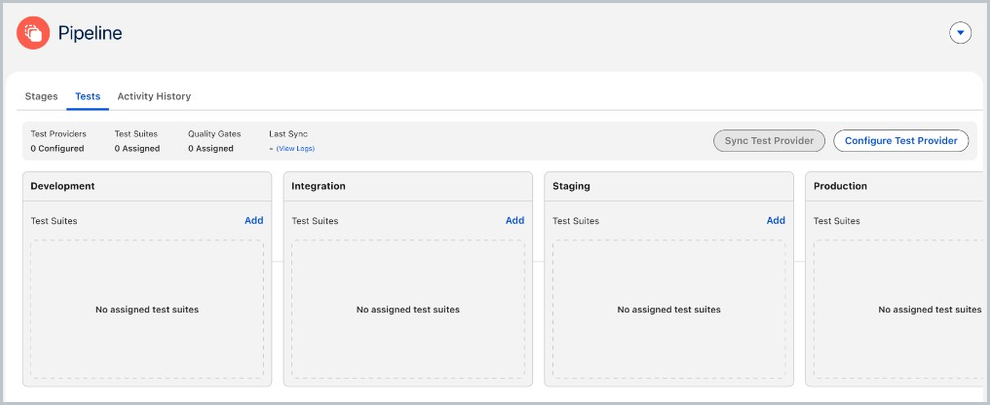
With Lifecycle Center Testing, you can:
- Automatically run test suites on review creation and before every promotion.
- Enforce quality gates with pass thresholds, severity limits, and essential test requirements.
- Monitor test execution and drill into granular results at any pipeline stage.
- Run tests manually when automated execution needs a targeted follow-up.
- Track a complete audit trail of test status, executions, and actions in the Activity History.
Provide Feedback
To provide general feedback, request support, or product enhancements, use the DevOps Center GitHub repository.