
Service resources or their assistants can share the time period during which the resources are available for appointment booking. They can define and share the appointment criteria with users by creating an invitation URL. Users can navigate to the invitation URL and book an appointment. The URL directs users to the starting week of when the service resource is available.
Required Editions
| Available in: Lightning Experience. |
| Available in: Enterprise and Unlimited Editions |
For example:
- A wealth manager (contractor) can generate an appointment invitation URL and add the URL to their signature. Prospective clients can use this URL to book appointments.
- An equity portfolio manager (contractor) wants to share their availability three months in the future with an existing client (authenticated consumer) for portfolio review. The equity portfolio manager can generate a URL with a start date that's three months from the current date, and then share the URL with the client.

Note An assistant can also create an appointment invitation URL on behalf of contractors
and then share the URL with clients.
Enable the resource availability sharing capability by using these flows:
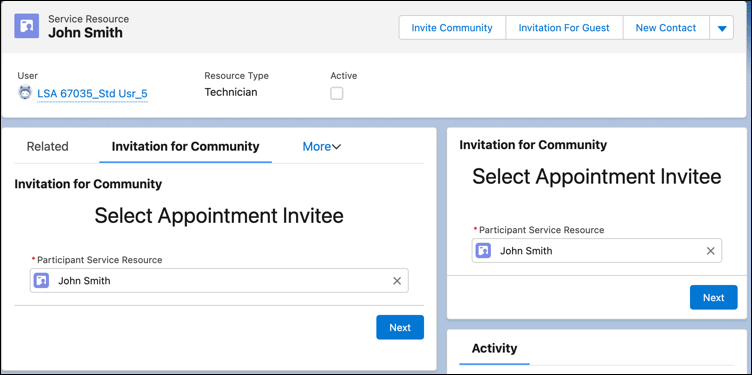
- Generate Appointment Invitation
- By using this flow, either service resources or their assistants can generate the
appointment invitation URL. Customers can customize the flow to enhance the appointment
booking experience. For example, customers can either select a default work type group or
service territory or skip the time slot preview page. They can also embed this flow by
using the Lightning App builder and launch the flow from an authenticated consumer’s
accounts page.
- Book Appointment from Invitation
- With this feature, users can book appointments by using the appointment invitation URL. Customers can customize this flow according to their requirement.
Note Both Generate Appointment Booking and Book Appointment from Invitation flows don’t
consider account’s visiting hours and resource preferences.
Watch the video to see how to share service resource availability by Using an Invitation URL.
If you aren’t able to watch the view in full screen, open the video on a new tab:  Share Service
Resource Availability by Using an Invitation URL.
Share Service
Resource Availability by Using an Invitation URL.
- Create an Invitation URL Prefix for Community Sites
To generate an appointment invitation URL, create a URL prefix first. Then enter the URL prefix in the InvitationURLPrefix flow variable of the Select Service Appointment Time flow screen component. - Create a Quick Action to Launch the Flow
With quick actions, you can launch and navigate through workflows and perform a series of actions with just a few clicks. For example, to generate invitations quickly, create a quick action for generating the appointment invitation flow. - AddFlow Quick Action to Service Resource Record Pages
To launch the generate appointment invitation flow from the Service Resource record page, add the flow quick action to the Service Resource record page. - Generate an Appointment Invitation URL
Generate appointment invitation URLs to share with your customers. Customers can use appointment invitation URLs to quickly book an appointment. - Generate an Appointment Invitation URL for a Customer Website
You can generate an appointment invitation URL that directly opens within a customer portal via Lightning Out. - Book a Service Appointment by Using an Appointment Invitation URL
Use the appointment invitation URL to book service appointments. - Service Resource Availability Sharing by Using an Actionable List
Make it easy and convenient for potential customers to book appointments with service resources. Use the actionable list to create an appointment invitation URL with a service resource’s availability and share the invitation URL with the potential customers via email. You can also use the actionable list to track the appointments that were booked by using that appointment invitation URL.