
Create criteria-based record-sharing rules to control which records are exposed to your guest users.
Required Editions
| Available in: Lightning Experience. |
| Available in: Enterprise and Unlimited Editions |

Note Operating Hours, Service Resource, Service Territory, Work Type, and Work Type Group
require at least one sharing rule each. Without at least one sharing rule per object,
unauthenticated users can’t access the records required for the Inbound New Guest Appointment
flow.
- From Setup, in the Quick Find box, enter Sharing, then select Sharing Settings.
- Under Service Resource Sharing Rules, click New.
-
Enter a label for the rule.
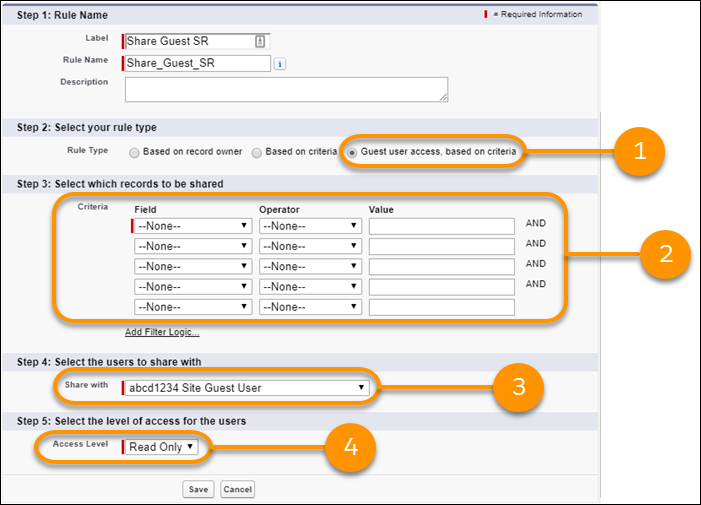
- Select Guest user access, based on criteria (1).
- Define the criteria for your guest record-sharing rule (2).
- From the Share with dropdown list, select your guest user (3).
- Set Access Level to Read Only (4), and then click Save.
- Repeat these steps for Operating Hours, Service Territory, Work Type, and Work Type Group sharing rules.