
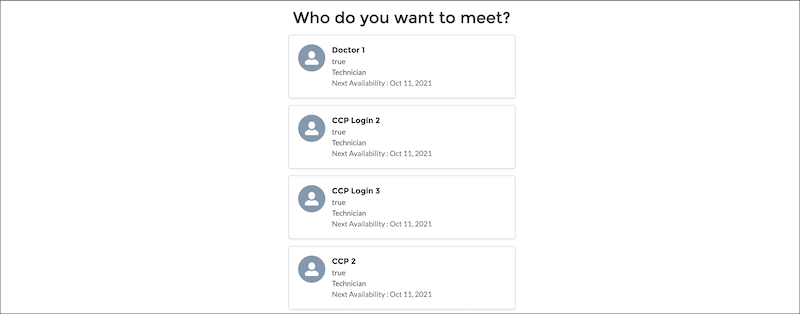
Enables users to view the list of available service resources (appointment attendees) and select a service resource.
Required Editions
| Available in: Lightning Experience. |
| Available in: Enterprise and Unlimited Editions |

| Attribute | Description | Additional Information |
|---|---|---|
| API Name | Use underscores and alphanumeric characters without spaces. Begin the name with a letter, don’t end the name with an underscore, and don’t use two consecutive underscores. |
|
| Service Territory |
The ID of the service territory for which the available service resources appear. Example: 0Hhxx0000004DUuCAM |
|
| Work Type Group |
The ID of the work type group for which the available service resources appear. Example: 0VSxx0000004D0GGAU |
|
| Anonymous Booking |
Indicates whether anonymous booking is enabled. If the value is set to true, an Anonymous Booking option appears. When a user selects this option, service resource selection doesn't happen on this component and takes place in the Select Resource Availability component. If a value isn’t set, false—the default value—is used. Example: {!$GlobalConstant.True} |
|
| Anonymous Booking Selected |
Indicates whether the user selected the Anonymous Booking option. If a value isn't set, false—the default value—is used. Example: {!$GlobalConstant.True} |
|
| Correlation Id |
The ID of the appointment scheduling data. Correlation Id is one of the parameters of the ServiceAppointmentRequestInfo class that’s passed to the ServiceResourceScheduleHandler Apex interface. For example, you can use the correlation ID to identify the system that’s calling the ServiceResourceScheduleHandler interface implementation. If a value isn't set, a random identifier is passed. |
|
| Default Time Zone |
The timezone according to which the availability of service resources is shown. If a value isn't set, time slots are shown according to the user's locale timezone. Here’s the list of accepted Timezone values. Example: America/Los_Angeles. |
|
| Filter By Resource IDs |
A comma-separated list of service resource IDs that are used to filter resources. Only the eligible service resources that are both in this list and in the selected service territory appear on the screen. Example: 0Hnxx0000004DdpCAE, 0Hnxx0000004DscCAE |
|
| Number of Resources to Show (Appointment Distribution) |
The number of service resources that appear when using Appointment Distribution. |
|
| Parent Record ID |
The ID of the parent record for which the service resource is selected. Supported values are account ID, case ID, opportunity ID, and lead ID. Example: 001xx000003GZQFAA4 |
|
| Scheduling Policy |
The developer name of the scheduling policy that's used to fetch resources. Note This field doesn’t support Salesforce ID.
Example: default_appointment_scheduling_policy |
|
| Service Resource |
The ID of the selected service resource. Example: 0Hnxx0000004D56CAE |
|
| Service Resource Booking |
Indicates whether service resource booking is enabled. If this value is set to true, the component shows available resources. If a value isn’t set, true—the default value—is used. Example: {!$GlobalConstant.True} |
|
| Show service resources by Availability |
Indicates whether service resources are sorted by availability such that the earliest available resources are shown first. If a value isn’t set, true—the default value—is used. Example: {!$GlobalConstant.True} |
|
| Validations |
The error messages in the Service Resource Availability component. This value is auto-populated. For example, the attribute stores the error message that’s generated when users navigate to the next screen without selecting a service resource. |
|