
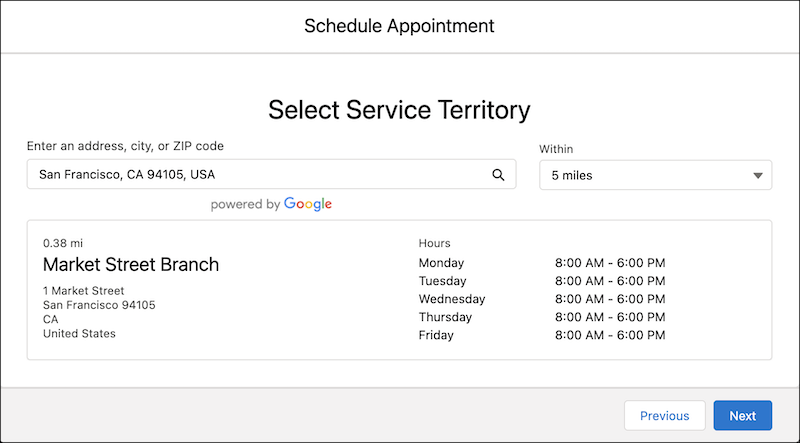
Enables users to select a service territory (branch or office location).
Required Editions
| Available in: Lightning Experience. |
| Available in: Enterprise and Unlimited Editions |
| Attribute | Description | Additional Information |
|---|---|---|
| API Name | Use underscores and alphanumeric characters without spaces. Begin the name with a letter, don’t end the name with an underscore, and don’t use two consecutive underscores. |
|
| City |
The city of the service territory. Example: San Francisco |
|
| Country |
The country of the service territory. Example: United States |
|
| Distance |
The search radius from the specified location. All the service territories in this search radius appear. Values can be specified in miles (mi) or kilometers (km). Supported values are:
|
|
| Distance Unit | The unit of the Distance attribute. Valid values are km and mi. |
|
| Filter by Service Territory IDs |
A comma-separated list of service territory IDs that are used to filter service territories. If a value is set, the component shows only the associated service resources. Example: 0Hhxx0000004DUuCAM, 0Hhxx0000004DEhCAM |
|
| Filter by Resource IDs |
A comma-separated list of resource IDs that are used to filter service territories. If a value is set, the component shows only supported service territories for these service resources. Example: 0Hnxx0000004DdpCAE, 0Hnxx0000004DscCAE |
|
| Hide Operating Hours | Indicates whether the operating hours of the service territories are hidden. If this value is set to true, the operating hours of the service territory don’t appear. |
|
| Latitude |
The latitude of the location entered by users. Latitude is auto-populated when a user selects a value suggested by Google search. Example: 37.7898 |
|
| Location |
The keywords entered to search for a service territory. Example: Salesforce Tower, San Francisco, CA, USA |
|
| Longitude |
The longitude of the location entered by users. Longitude is auto-populated when a user selects a value suggested by Google search. Example: –122.39695 |
|
| Postal Code |
The postal code of the service territory. Example: 94105 |
|
| Service Resource |
The ID of the service resource whose territories are shown. Example: 0Hnxx0000004DdpCAE |
|
| Service Territory |
The ID of the service territory. Example: 0Hhxx0000004DUuCAM |
|
| State |
The state of the service territory. Example: CA |
|
| Street | The street of the service territory. |
|
| Validations |
The error messages in the Select Service Territory component. This value is auto-populated. For example, the attribute stores the error message that’s generated when a user tries to navigate to the next screen without selecting a location. |
|
| Work Type Group |
The ID of the work type group that's used to filter service territories.  Note Always set a value for this attribute.
Example: 0VSxx0000004D0GGAU |
|