
Enables guest users to view a service appointment.
Required Editions
| Available in: Lightning Experience. |
| Available in: Enterprise and Unlimited Editions |
| Attribute | Description | Additional Information |
|---|---|---|
| API Name | Use underscores and alphanumeric characters without spaces. Begin the name with a letter, don’t end the name with an underscore, and don’t use two consecutive underscores. |
|
| Appointment Type |
The selected appointment type. |
|
| Contact ID | This attribute isn’t used. |
|
| Parent Record ID |
Don't set a value for this attribute for inbound guest flows. In inbound guest flows, a lead is created and its ID is used as the parent record ID. If this value is set, the lead passed to the Save Appointment action isn’t used and the value set for this attribute is used. If you want to set a value for this attribute, supported values are account ID, case ID, opportunity ID, and lead ID. |
|
| Service Appointment Additional Information |
The additional information for the service appointment. Users can’t edit this information from the screen. |
|
| Service Appointment City |
The city of the service territory. Example: San Francisco |
|
| Service Appointment Comments | The comments for the service appointment. Users can’t edit this value from the screen. |
|
| Service Appointment Country |
The country of the service territory. Example: United States |
|
| Service Appointment End Date and Time |
The end time of the time slot. Format: MM/DD/YYYY, hh:mm AM/PM Example: 2021-06-14T19:30:00Z |
|
| Service Appointment Postal Code |
The postal code of the service territory. Example: 94105 |
|
| Service Appointment Start Date and Time |
The start time of the time slot. If a value is set, a time slot that starts at this time is selected by default. Format: MM/DD/YYYY, hh:mm AM/PM Example: 6/8/2021, 7:00 PM |
|
| Service Appointment State |
The state of the service territory. Example: CA |
|
| Service Appointment Street |
The street of the service territory. Example: 415 Mission St. |
|
| Service Resource ID |
The ID of the service resource. Example: 0Hnxx0000004DiiCAE |
|
| Service Territory ID |
The ID of the service territory. Example: 0Hhxx0000004DUuCAM |
|
| Work Type Group ID |
The ID of the work type group. Example: 0VSxx0000004D0GGAU |
|
| Additional Field Values |
The values of attributes of this screen in JSON format. It’s passed to the save appointment action as input in predefined flows. This attribute’s value is auto-populated. |
|
| Anonymous Booking Selected | This attribute isn’t used. |
|
| Enable Guest User |
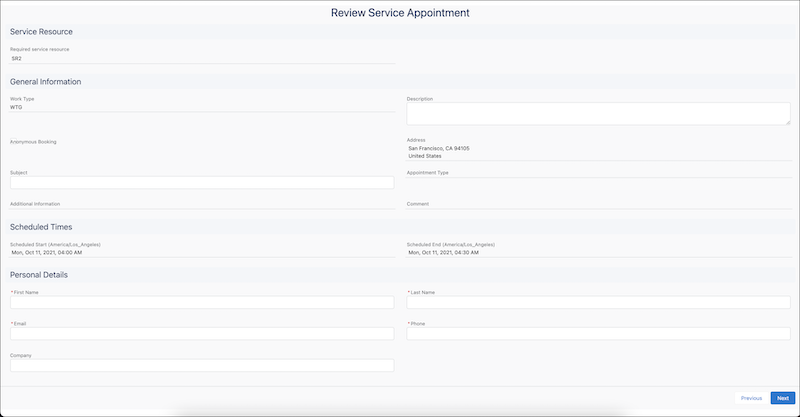
Indicates whether the component is used in a guest flow. Always set this value to true when using this component for inbound guest flows so that a lead is properly generated. If the value is set to false, the Personal Details section doesn’t appear and the optional attendees section appears. The phone, email, parent record id, and account id fields also appear. When this value is true, the flow runs in a guest context, and the Phone and Email fields from the service appointment page layout are always suppressed on the Review Service Appointment screen, regardless of the field-level security or page layout set for those fields. Guest users enter their contact information in the Personal Details section instead, which uses the Lead fields First Name, Last Name, Email, Phone, and Company. There’s no supported way to show the service appointment’s own Phone and Email fields to guest users. If a value isn't set, false—the default value—is used. Example: {!$GlobalConstant.True} |
|
| Lead | The lead object used to populate the First Name, Last Name, Email, Phone, and Company fields in the Personal Details section. To render the Personal Details section for guest users, grant the Guest User profile read access to these Lead fields. |
|
| Optional service resource |
This attribute isn’t used in guest flows. A list of comma-separated IDs of resources to add to a service appointment. |
|
| Save Error Message |
Any error message generated when saving the appointment. In predefined flows, these error messages are generated in the Save Appointment action. |
|
| Scheduling Policy |
The developer name of the scheduling policy that is used by the schedule optimizer.  Note This field doesn’t support Salesforce ID.
Example: default_appointment_scheduling_policy |
|
| Service Appointment |
The values of all the service appointment attributes. You can use this attribute to set service appointment field values instead of setting them separately. You can also set values of fields that are unavailable on the Review Screen. You can set values for these fields:
To populate this field:
Note Some of the fields—such as Phone, Email, and Province—don’t
appear on the screen.
|
|
| Service Appointment ID | This attribute isn’t used. |
|
| Service Resources | This attribute isn’t used. |
|
| Show Service Resource |
Indicates whether to show the Service Resources screen. If a value isn't set, true—the default value—is used. Example: {!$GlobalConstant.True} |
|
| Time Slot is Changed | This attribute isn’t used. |
|
| Time Zone |
The time zone according to which the appointment start time and end time are shown. If a value isn't set, the appointment start time and end time are shown according to the user's locale time zone. Here’s the list of accepted time zone values. Example: America/Los_Angeles |
|
| Validations | Any error messages in the component. This value is auto-populated. For example, the attribute stores the error message that’s generated when a user enters an incorrect email address. |
|
| Work Type ID | This attribute isn’t used. |
|