
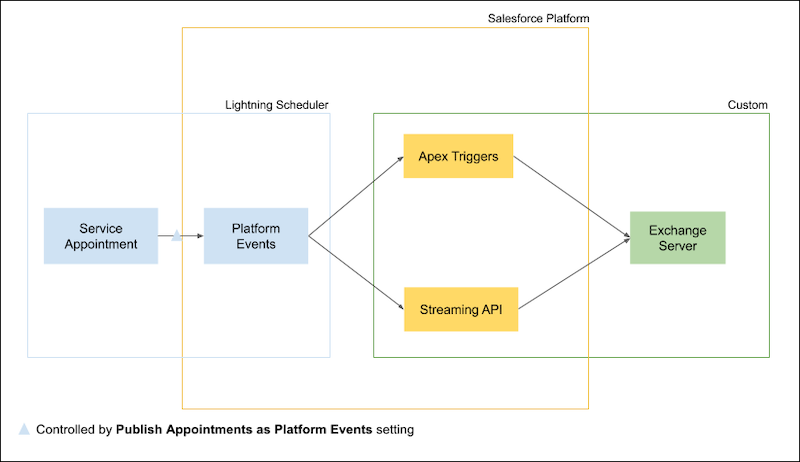
Enable the Publish Appointments as Platform Events setting, subscribe to the AppointmentSchedulingEvent platform event, and then use APIs to write appointments to external calendars.
Required Editions
| Available in: Lightning Experience. |
| Available in: Enterprise and Unlimited Editions |
-
Enable the Publish Appointments as Platform Events setting to let new appointments or
appointment updates trigger high-volume platform events.
- From Setup, in the Quick Find box, enter Salesforce Scheduler, then select Salesforce Scheduler Settings.
- Enable Publish Appointments as Platform Events.
A platform event is published when:
- A service appointment with an assigned resource is created.
- A service appointment is deleted.
- An assigned resource is added or removed.
- When at least one of the following fields changes in the
SvcApptSchdEventevent object. This event object represents the Service Appointment object.SchedStartTimeSchedEndTimeDurationInMinutesWorkTypeServiceTerritoryAddressStatusCategoryAppointmentTypePhoneSubjectCommentsAdditionalInformationEmailContact
- When at least one of the following fields changes in the
AsgnRsrcApptSchdEventevent object. This event object represents the Assigned Resource object.ServiceResourceIsRequiredResourceIsPrimaryResource
 Note
Note- A time slot blocked before or after an appointment doesn’t trigger a platform event. Instead, these blocked time slots are added to the event payload itself.
- An Asset service resource booked in an appointment doesn’t trigger a platform event.
- Subscribe to the AppointmentSchedulingEvent platform event with Apex triggers, EMP Connector, a CometD client, or a third-party connector such as the Salesforce Platform Events Source Connector for Confluent Platform.
-
Implement APIs to write the platform event changes to your email server. For example, use
Microsoft Graph REST API to publish the events in Microsoft® Outlook®.
For external calendars that support custom fields, we recommend that you store the service appointment IDs as custom fields for easy appointment updates.
See Also
- Platform Events Developer Guide: Subscribing to Platform Events
- Platform Events Developer Guide: AppointmentSchedulingEvent
- Platform Events Developer Guide: Example: Subscribe to and Replay Events Using a Java Client (EMP Connector)
- Salesforce Platform Events Source Connector for Confluent Platform
- Get Access on Behalf of a User