
To determine time slots with shifts, enable shift-related rules in the scheduling policy. To consider a service territory member’s shifts instead of the service territory member’s operating hours, enable the Use service territory member’s shift option. However, if you want to consider the intersection of shifts and the service territory’s operating hours, then enable the Use service territory’s operating hours with shifts option along with the Use service territory member’s shift option. To consider the account’s operating hours along with the intersection, enable the Enforce Account’s Visiting Hours option.
Required Editions
| Available in: Lightning Experience. |
| Available in: Enterprise and Unlimited Editions |
Depending on the rules that you define in the scheduling policy, Salesforce Scheduler determines the availability of appointment time slots according to:
- Shift timings
- Intersection of time slots in operating hours of the service territory and shift timings
- Intersection of time slots in operating hours of the account and shift timings
- Intersection of time slots in operating hours of the service territory, operating hours of an account, and shift timings

- If you enable the Use service territory member's shift option and the service resource doesn't have any shifts, no time slots are available.
| Use service territory member's shift | Use service territory's operating hours with shifts | Enforce Account’s Visiting Hours | Salesforce Scheduler determines time slots based on |
|---|---|---|---|
| Enabled | Disabled | Disabled |
Shifts. Example:
 Note Salesforce Scheduler doesn't consider the service territory's
operating hours.
|
| Enabled | Disabled | Enabled |
The intersection of shifts and the account's operating hours. Example:
Note Salesforce Scheduler doesn't consider the service territory's
operating hours.
|
| Enabled | Enabled | Disabled |
The intersection of shifts and service territory's operating hours. Example:
|
| Enabled | Enabled | Enabled |
The intersection of shifts, service territory's operating hours, and account's operating hours. Example:
|

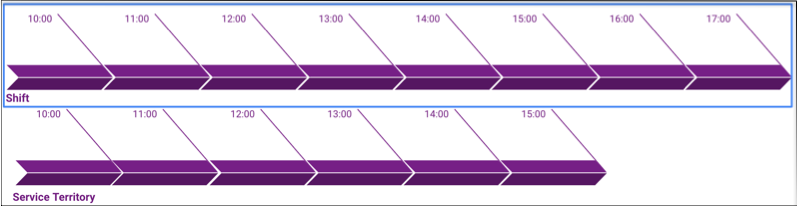
Bruce, a contractor, specializes in loan management and manages his own availability independent of any branch. To reflect his availability, he creates shifts from 10 AM to 5 PM, Monday to Friday. The operating hours of the 1 Market St. branch are 10 AM to 3 PM, Monday to Friday. Salesforce Scheduler shows time slots that are based only on Bruce's shifts, and doesn’t consider the branch’s operating hours.
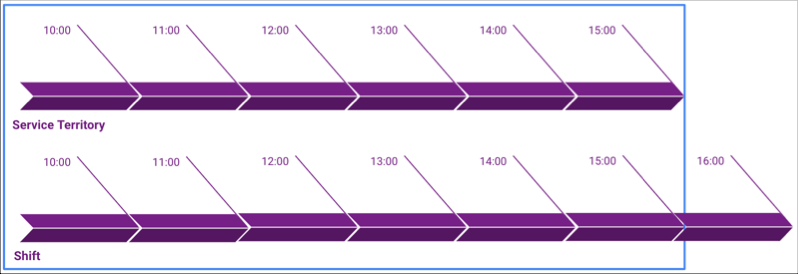
John, a banker, works in the 1 Market St. branch. The operating hours of the 1 Market St. branch are from 10 AM to 3 PM, Monday to Friday. To schedule more appointments, John creates his shifts from 10 AM to 4 PM, Monday to Thursday. However, the branch manager has a strict policy to schedule appointments only during the branch’s operating hours.
Salesforce Scheduler now shows time slots from 10 PM to 3 PM for John based on his shifts and the branch’s operating hours.
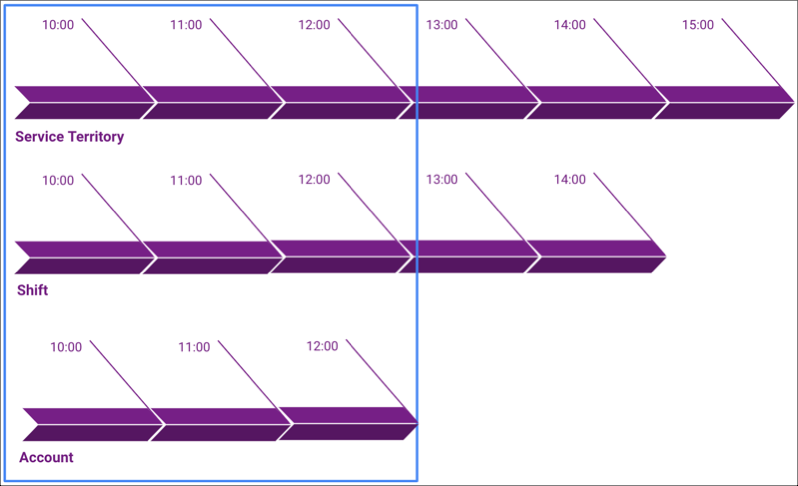
John, a banker, works in the 1 Market St. branch. The operating hours of the 1 Market St. branch are 10 AM to 3 PM, Monday to Friday. Jane, a customer, only makes appointments between 10 AM and 12 PM. John has created shifts between 10 AM and 2 PM. When John wants to schedule an appointment with Jane, the available time slots are between 10 AM and 12 PM. The time slots are determined based on the intersection of the branch’s operating hours, John’s shifts, and Jane’s operating hours.
- Define Shift Rules in Scheduling Policy
To use shifts instead of the service territory member’s operating hours when determining available time slots, enable shift-specific rules in the scheduling policy.