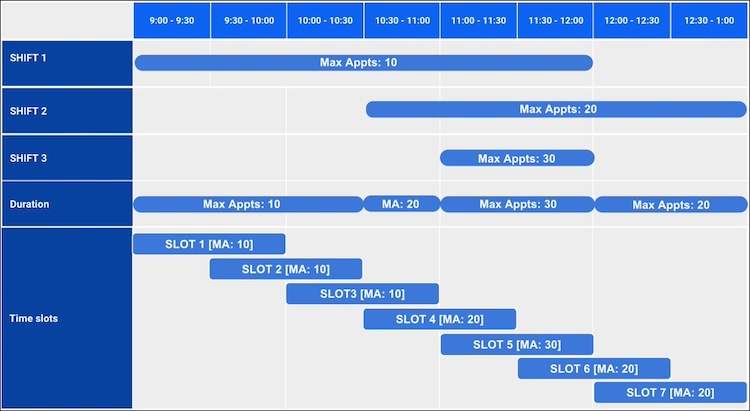
A territory manager or a service resource creates concurrent shifts by defining the maximum number of appointments for the associated topic. If they create overlapping shifts with a different concurrency for each of these shifts, then Salesforce Scheduler selects the maximum number of concurrency for a shift duration and minimum concurrency while determining the overlapping time slots within these shifts.
Required Editions
| Available in: Lightning Experience. |
| Available in: Enterprise and Unlimited Editions |

| Shift Number | Start Time | End Time | Maximum Appointments |
|---|---|---|---|
| 1 | 9:00 AM | 12:30 PM | 10 |
| 2 | 10:30 AM | 01:00 PM | 20 |
| 3 | 11:00 AM | 12:00 PM | 30 |
Salesforce Scheduler breaks these shifts into smaller durations by considering the maximum number of appointments for overlapping shifts.
| Duration | Start Time | End Time | Maximum Appointments |
|---|---|---|---|
| 1 | 9:00 AM | 10:30 AM | 10 |
| 2 | 10:30 AM | 11:00 AM | 20 |
| 3 | 11:00 AM | 12:00 PM | 30 |
| 4 | 12:00 PM | 1:00 PM | 20 |
In the shifts that John created, the work type duration is 1 hour and the appointment start time interval is 30 minutes. So, here’s how Salesforce Scheduler shows John’s time slot availability.
| Time Slot | Start Time | End Time | Maximum Appointments |
|---|---|---|---|
| 1 | 9:00 AM | 10:00 AM | 10 |
| 2 | 9:30 AM | 10:30 AM | 10 |
| 3 | 10:00 AM | 11:00 AM | 10 |
| 4 | 10:30 AM | 11:30 AM | 20 |
| 5 | 11:00 AM | 12:00 PM | 30 |
| 6 | 11:30 AM | 12:30 PM | 20 |
| 7 | 12:00 PM | 1:00 PM | 20 |