
Customize the Select Service Resource Screen
Customize the Select Service Resource screen and the options that appear on the screen.
Required Editions
| Available in: Lightning Experience. |
| Available in: Enterprise and Unlimited Editions |
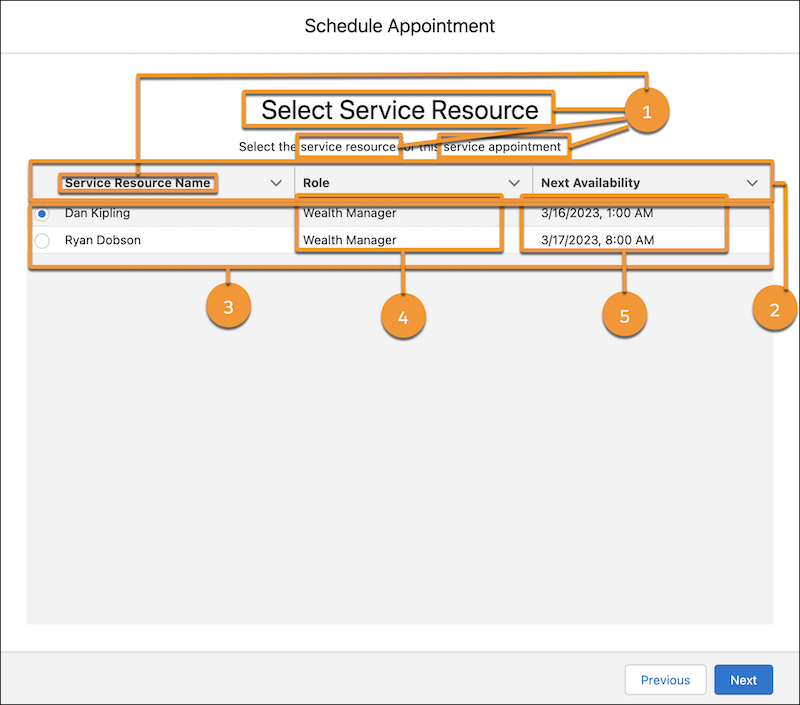
| UI Element | How to Customize the Element |
|---|---|
| The title and field labels (1) | Change Labels in Flow Screens |
| The order in which service resources are sorted (2) | Flow Screen Component: Select Service Resource |
| The maximum number of service resources that appear on the screen (3) | Flow Screen Component: Select Service Resource |
|
The roles associated with service resources (4)  Note You can show
roles if necessary. Salesforce Scheduler doesn’t use these roles
to determine availability.
|
Add values to the Roles picklist of the Service Territory Member entity. See Add or Edit Picklist Values. Then assign roles using the Role picklist on service territory member records. |
| The time zone based on which next available time slots are shown (5) | Flow Screen Component: Select Service Resource |
| The Select Service Resource screen |