
Customize the Select Service Appointment Time screen and the options that appear on the screen.
Required Editions
| Available in: Lightning Experience. |
| Available in: Enterprise and Unlimited Editions |
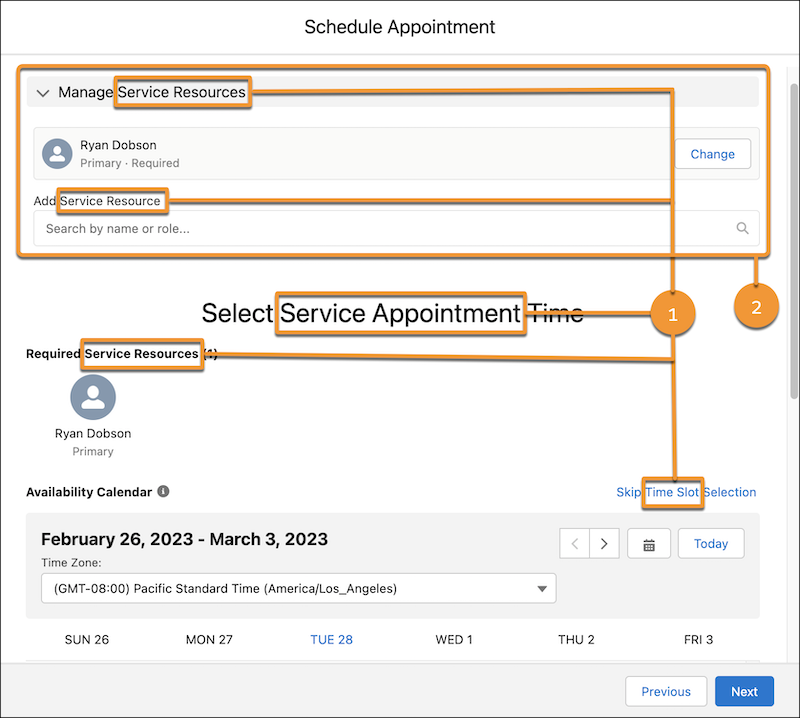
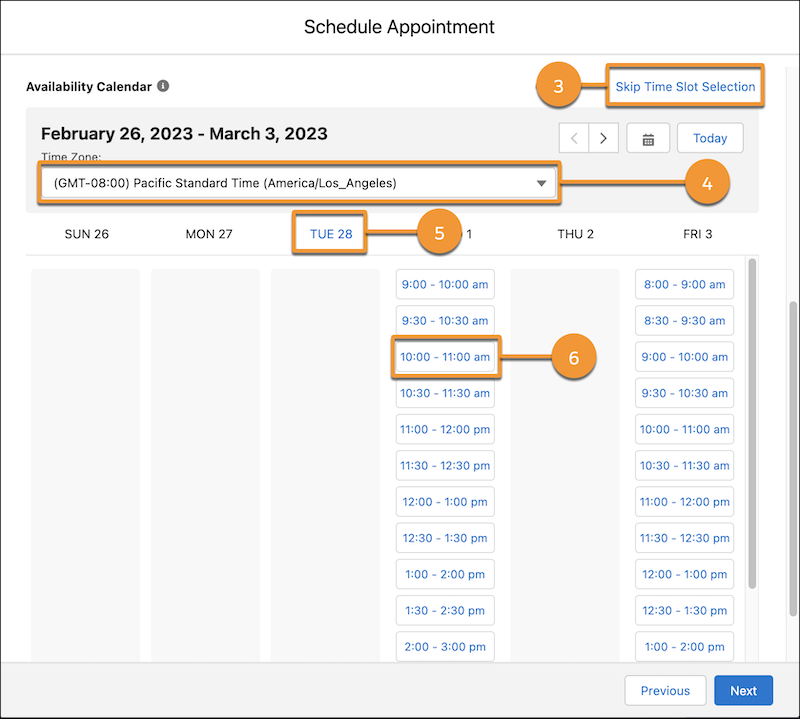
| UI Element | How to Customize the Element |
|---|---|
| The title and field labels (1) | Change Labels in Flow Screens |
| The Manage resources option (for multi-resource scheduling) (2) | Flow Screen Component: Select Service Appointment Time |
| The Skip Time Slot Selection option (3) | Flow Screen Component: Select Service Appointment Time |
| The Time Zone picklist (4) | Flow Screen Component: Select Service Appointment Time |
| The preselected start date (5) | Flow Screen Component: Select Service Appointment Time |
| The preselected start time and end time (6) | Flow Screen Component: Select Service Appointment Time |
| The Select Service Appointment Time screen |