
To generate an appointment invitation URL, create a URL prefix first. Then enter the URL prefix in the InvitationURLPrefix flow variable of the Select Service Appointment Time flow screen component.
Required Editions
| Available in: Lightning Experience. |
| Available in: Enterprise and Unlimited Editions |
Ensure that you’ve created a flow page and configured the Book Appointment from Invitation flow for your site. To pass the invitation key to the flow, when you configure the flow, enter {!invitationKey} in the invitationKey field.

Note Ensure that the flow is added to the Content section of the flow page. Otherwise, the
value of the invitationKey field doesn’t pass to the site URL.
- From Setup, in the Quick Find box, enter Digital Experiences, and then select All Sites.
- On the All Sites page, click Builder next to the community site for which you want to generate the invitation URL.
-
In Experience Builder, click the settings icon (
 ).
).
-
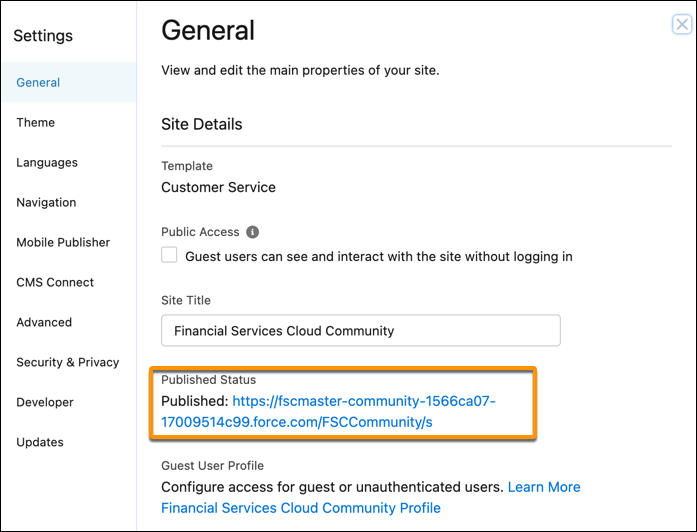
From the General settings page, copy and then paste the published URL in a text
editor.
-
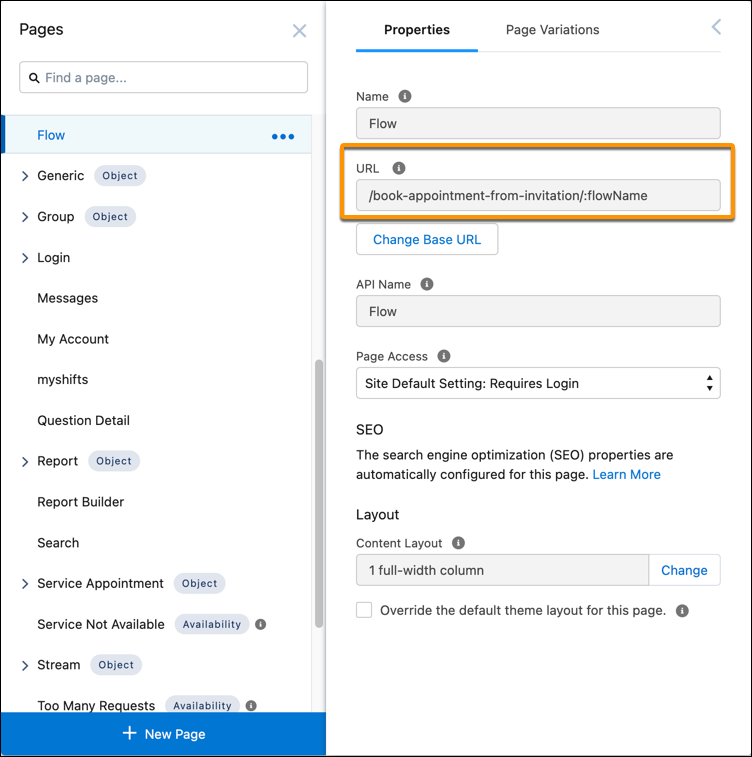
From the Properties settings of your page, copy the base URL from the URL field and paste
it after the published URL in the text editor.
-
Replace :flowName with the API name of the configured Book Appointment from Invitation
flow.
Book_appointment_from_invitation_for_partnersThe Invitation URL prefix is created. For example: https://fscmaster-community-1566ca07-17009514c99.force.com/FSCCommunity/s/book-appointment-from-invitation/Book_appointment_from_invitation_for_partners