Appointment distribution lets you
allocate appointments quickly and evenly among service resources. An equitable distribution of
appointments ensures efficient use of service resources and increased productivity. Salesforce
Scheduler uses service resources’ utilization scores to identify and suggest the least
occupied eligible service resources for appointments. For an anonymous appointment, the least
occupied eligible resource is automatically assigned to the appointment.
Required Editions
| Available in: Lightning Experience. |
| Available in: Enterprise and Unlimited Editions |
To enhance the
scheduling experience for users when appointment distribution is enabled, you can:
- Optimize the performance by defining the maximum number of eligible service resources
you want to show for scheduling. Scheduling is a performance-intensive process. As the
number of eligible resources increases, Salesforce Scheduler takes longer to fetch the
resource list.
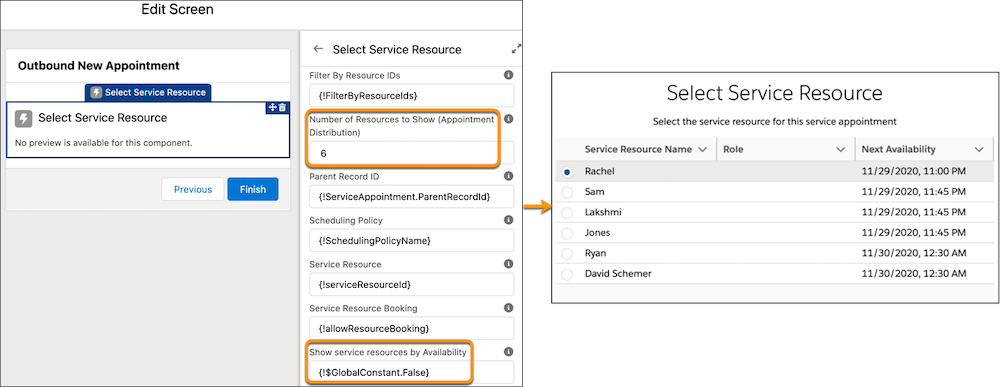
Use the new Number of Resources to Show (Appointment Distribution)
attribute in flows. This attribute is available in the Select Service Resource, Service
Resource Availability, Select Service Appointment Time, and Select Service Resource and
Service Appointment Time screen components. If you’re using APIs, use the
resourceLimitApptDistribution parameter. This parameter is available in the
getAppointmentCandidates REST API and the available-territory-slots Connect
API.
- List the service resources based on their workload, with the least occupied resource at
the top.
Set the new Show service resources by Availability attribute to
False. This attribute is available in the Select Service
Resource, Service Resource Availability, and Select Service Resource and Service
Appointment Time screen components. By default, it’s set to True
and it sorts the resources by the earliest next availability date and time.
- Enable Appointment Distribution
Enable the Appointment Distribution and Aggregate Resource Use settings. Then define an appointment assignment policy to calculate resource utilization and link the assignment policy to your scheduling policy.
- How Appointment Distribution Works
These topics explain how appointment scheduling works when appointment distribution is enabled.
